
How to Improve Outdoor Display Visibility Under Direct Sunlight
Outdoor digital signage is widely used in retail storefronts, shopping centers, restaurants, transportation hubs, drive-thru lanes, and public advertising spaces. However, one of the biggest challenges for outdoor LCD displays is maintaining clear, readable images under direct sunlight.
When sunlight hits a screen, reflected light can wash out images, reduce perceived contrast, and make text difficult to read. Even a high-resolution display may perform poorly outdoors if its brightness, surface treatment, and thermal management system are not properly designed.
So, how can you improve outdoor display visibility under direct sunlight?
In this guide, we explain the key technologies and design considerations that help outdoor digital signage deliver clear, reliable performance in bright outdoor environments. Whether you are sourcing outdoor advertising screens for a commercial project or evaluating an OEM/ODM manufacturing partner, these factors will help you make a more informed decision.
1. Choose a High-Brightness Display
Brightness is one of the most important factors affecting outdoor screen visibility.
Display brightness is measured in nits, or candelas per square meter (cd/m²). A higher nit value means the screen can produce more light, helping its content remain visible when competing with strong ambient light.
How Many Nits Do You Need for Outdoor Digital Signage?
The appropriate brightness depends on the installation environment, direct sunlight exposure, screen orientation, and surface reflection.
- 700–1,000 nits: Suitable for many indoor environments and some shaded or semi-outdoor applications.
- 1,000–1,500 nits: May suit semi-outdoor storefronts and outdoor locations with limited direct sunlight, depending on the surrounding conditions.
- 1,500–2,500 nits: A practical range to consider for many outdoor digital signage applications exposed to strong daylight.
- 2,500 nits and above: May be appropriate for demanding direct-sunlight environments, subject to thermal design, power consumption, and installation requirements.
These ranges are general guidelines, not universal thresholds. The actual brightness requirement should be determined through on-site lighting conditions, viewing distance, screen size, and content testing.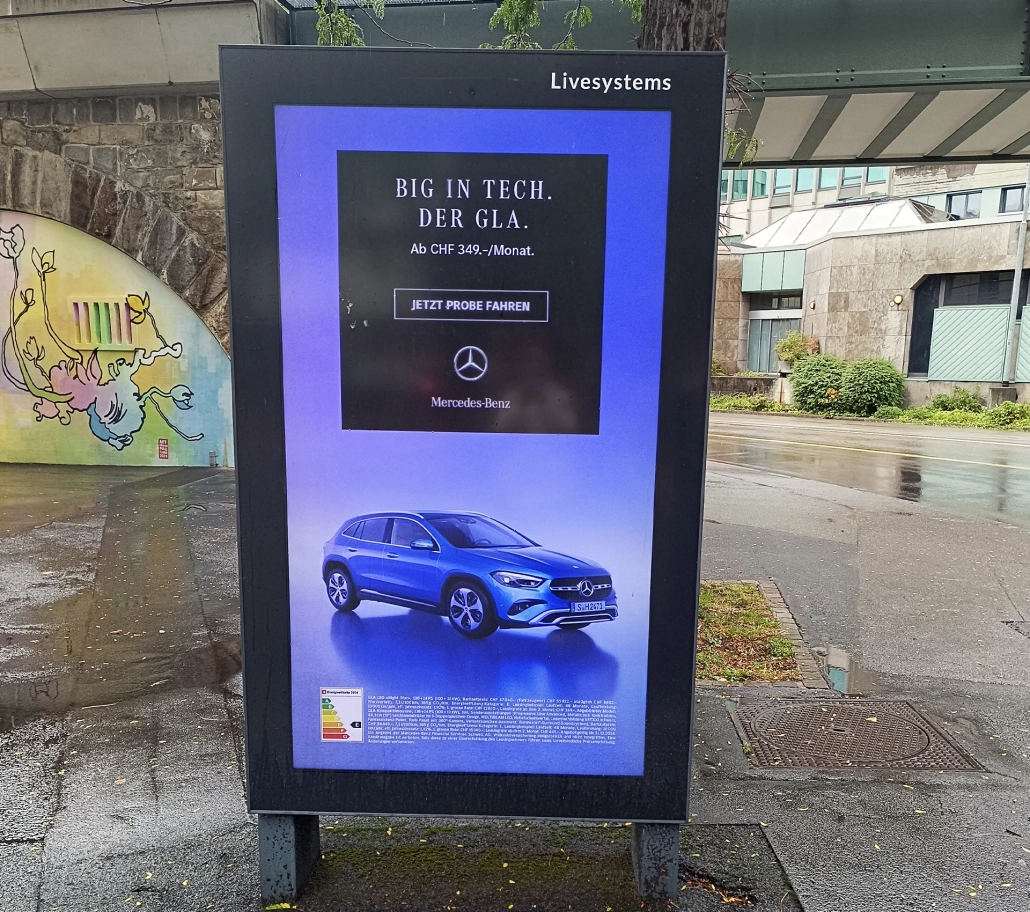
Why Is High Brightness Important?
A high-brightness LCD display produces enough light to help overcome the effects of strong ambient illumination. This can improve the readability of text, visibility of promotional images, and recognition of advertising content.
For digital menu boards, retail window displays, and roadside advertising screens, appropriate brightness helps customers read prices, product information, and promotional messages without struggling to see the screen.
Buyer tip: Do not evaluate an outdoor display by its advertised nit rating alone. Ask whether the specified brightness is the typical or maximum value, whether it is measured at the screen surface, and whether the display can sustain the required brightness during extended operation.
2. Use Anti-Glare Technology to Reduce Reflections
High brightness alone cannot eliminate the effects of reflected sunlight.
When sunlight reflects off the front surface of an LCD display, it creates glare that can obscure on-screen content. This is particularly noticeable when screens are installed behind shop windows, near glass building facades, or in open areas with changing sun angles.
Anti-glare technology helps diffuse reflected light, reducing distracting reflections and improving viewing comfort.
What Should You Look for in an Anti-Glare Display?
When evaluating an outdoor LCD display, consider the following:
- Anti-glare surface treatment: Helps scatter reflected light rather than producing sharp reflections.
- Appropriate surface finish: The finish should balance reflection control, image sharpness, color reproduction, and cleaning requirements.
- Reflection performance: Ask for relevant optical specifications or test results instead of relying only on marketing descriptions.
- Application suitability: Different environments may require different surface treatments, especially for retail windows, outdoor kiosks, and roadside signage.

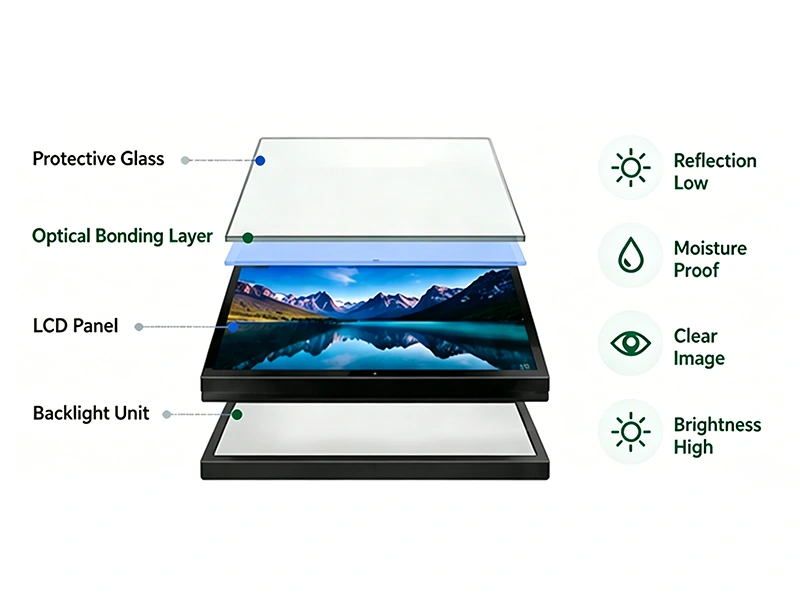
It is important to distinguish anti-glare from anti-reflective technology. Anti-glare treatments primarily diffuse reflections, while anti-reflective coatings are designed to reduce the amount of light reflected from a surface. Their performance and visual effects differ.
For demanding installations, evaluate brightness and reflection performance together. A bright screen with excessive front-surface reflections may still be difficult to read in direct sunlight.
3. Consider Optical Bonding for Better Outdoor Visibility
Optical bonding is another technology worth considering for outdoor digital signage, particularly in demanding environments.
In a conventional display assembly, small air gaps may exist between the LCD panel and its front cover glass. These interfaces can create additional internal reflections. Optical bonding uses a transparent bonding material to fill the gap between optical components, helping reduce interface reflections.
Depending on the design, optical bonding can provide several benefits:
- Improved perceived contrast in bright environments.
- Reduced internal reflections between display layers.
- Better optical clarity and image readability.
- Improved resistance to dust and moisture entering the bonded interface.
- Potentially better mechanical robustness of the display assembly.
Optical bonding does not eliminate all reflections from the outer surface, nor does it replace the need for adequate brightness or appropriate surface treatment. Its benefits depend on the bonding material, optical design, and manufacturing quality.
For outdoor advertising screens, industrial display systems, and commercial LCD monitors installed in bright locations, optical bonding may be a valuable option when overall optical performance is a priority.
4. Install the Display at the Right Angle
Screen installation has a significant effect on visibility under direct sunlight.
Even a high-brightness outdoor digital signage display can become difficult to read if the sun strikes its surface at an unfavorable angle. Reflections may be directed toward the viewer, while glare from nearby glass or reflective buildings can further reduce readability.
Best Practices for Outdoor Display Installation
Avoid direct reflections toward the viewer. Evaluate the screen position at different times of day and across different seasons when practical.
Choose the correct mounting angle. Tilting or repositioning the display can help reduce direct reflections and improve viewing comfort. The optimal angle depends on the sun’s path, viewing height, and audience position.
Use architectural shading where possible. Canopies, awnings, and carefully designed structures can reduce direct solar exposure without blocking the screen from its intended audience.
Consider the direction of the screen. North-facing, south-facing, east-facing, and west-facing installations may experience different sunlight patterns depending on their geographic location.
Test the actual viewing distance. A screen that looks clear from close range may be difficult to read by pedestrians, drivers, or customers viewing it from farther away.
For drive-thru menu boards, roadside advertising, and outdoor self-service kiosks, screen positioning should be evaluated as part of the overall installation design rather than treated as an afterthought.
5. Use Automatic Brightness Control
Outdoor lighting conditions can change dramatically throughout the day. A screen may face intense sunlight at noon and much lower ambient light in the evening.
Keeping brightness permanently at maximum can increase power consumption, generate additional heat, and accelerate the wear of certain display components.
Automatic brightness control helps the screen adapt to changing ambient light.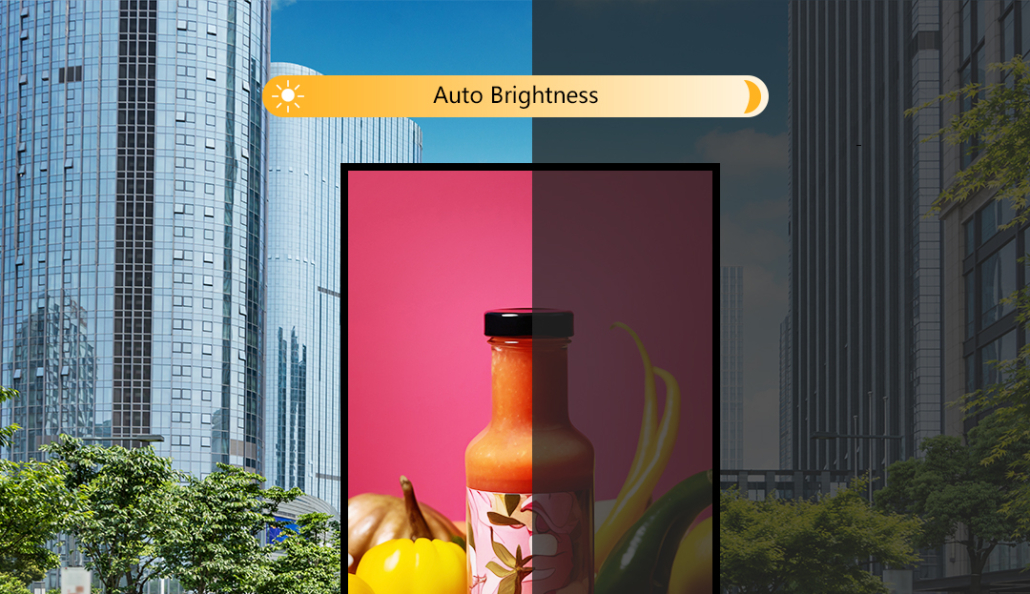
How Does Smart Brightness Control Work?
A light sensor measures the surrounding illumination. The display controller then adjusts the backlight according to configured brightness levels or a brightness curve.
A well-designed system can:
- Increase brightness when ambient light becomes stronger.
- Reduce brightness at night or in shaded conditions.
- Improve viewing comfort across changing light conditions.
- Help manage power consumption and thermal load.
- Support more consistent day-to-night operation.
When sourcing outdoor digital signage, confirm that the light sensor, control settings, and backlight system support the brightness range required for your application.
For commercial projects with many installed displays, centralized configuration and remote monitoring may also help simplify maintenance and operation.
6. Manage Heat to Maintain Stable Brightness
Direct sunlight creates two separate challenges: it increases the amount of ambient light competing with the screen, and it heats the display enclosure.
An outdoor LCD display operating in direct sunlight may experience substantial thermal load, especially when its backlight is running at high brightness for long periods.
Excessive heat can affect component reliability, reduce the stability of system operation, and trigger protective brightness reduction in designs equipped with thermal safeguards.
Essential Thermal Management Features
Efficient heat dissipation: The enclosure should be designed to transfer heat away from critical components.
Appropriate active cooling: Fans or other active cooling systems may be necessary for high-brightness displays operating in demanding environments. Their design should account for dust, moisture, noise, and maintenance.
Temperature monitoring: Sensors and control systems can help regulate operating conditions and protect the display from excessive heat.
Suitable enclosure design: Outdoor enclosures should balance heat dissipation with the required protection against water, dust, and environmental exposure.
Validated operating temperature: Check the manufacturer’s rated operating temperature and test conditions rather than assuming that every outdoor-rated screen can operate reliably in every climate.
Thermal management is especially important for high-brightness outdoor digital signage designed for long operating hours, including drive-thru menu boards, outdoor kiosks, and roadside advertising displays.
A display should be evaluated not only by its peak brightness but also by its ability to maintain suitable performance under the expected ambient temperature and operating schedule.
7. Select the Right LCD Panel and Contrast Performance
Brightness is important, but it is only one part of outdoor readability.
A screen with high brightness and poor contrast may still struggle to display detailed content. Contrast describes the difference between the brightest white and darkest black that a display can produce under specified measurement conditions.
For outdoor digital signage, the perceived contrast under ambient light is often more relevant than the panel’s laboratory contrast specification alone.
Key Factors to Evaluate
- Native panel contrast: Affects the distinction between light and dark image areas.
- Viewing angle: Helps ensure that content remains readable when viewers approach from different directions.
- Color performance: Supports the accurate reproduction of brand colors, product images, and promotional graphics.
- Panel quality and consistency: Important for commercial installations requiring multiple displays with similar visual performance.
- Ambient-light performance: Evaluate the complete display, including its front glass, coatings, and bonding structure.
IPS LCD panels are often considered for commercial applications that require wide viewing angles. However, panel type alone does not guarantee sunlight readability. Brightness, reflection control, contrast, and installation conditions must be evaluated together.
8. Choose a Display Designed for the Outdoor Environment
Not every high-brightness display is suitable for permanent outdoor installation.
An indoor commercial display placed in an outdoor enclosure may lack the environmental protection, cooling capacity, or component selection required for long-term outdoor operation.
When purchasing an outdoor LCD display, evaluate the entire system rather than focusing only on the LCD panel.
Outdoor Display Features to Check
| Feature | Why It Matters |
|---|---|
| High-brightness backlight | Improves visibility in bright ambient conditions |
| Anti-glare or anti-reflective treatment | Helps control reflections |
| Optical bonding, where appropriate | Can reduce internal reflections |
| Outdoor-rated enclosure | Provides protection against specified environmental conditions |
| Thermal management | Helps maintain stable operation |
| Automatic brightness control | Adapts brightness to changing ambient light |
| Continuous-operation rating | Indicates suitability for the intended operating schedule |
| Remote content management | Simplifies deployment and content updates across multiple locations |
| Serviceability | Helps reduce maintenance complexity and downtime |
Check the actual IP rating, operating temperature range, certifications, and continuous-operation specifications of the complete product. Do not assume that every model includes every feature.
For distributors and system integrators, a consistent product specification and reliable technical documentation can be just as important as screen brightness.
9. Optimize Content for Outdoor Viewing
Display hardware is only part of the solution. Content design also influences how easily people can read information outdoors.
A well-designed screen can still deliver a poor viewing experience if the text is too small, the background is too busy, or the content relies on subtle color differences.
Outdoor Digital Signage Content Best Practices
- Use large, readable text. Prioritize essential messages, prices, calls to action, and menu items.
- Increase visual contrast. Use clearly differentiated text and background colors.
- Avoid overly complex layouts. Keep messages concise and organize information by importance.
- Use bold typography where appropriate. Clear letterforms help viewers recognize text quickly.
- Limit unnecessary animation. Excessive movement can distract viewers and make information harder to process.
- Test content in real conditions. Review the design in direct sunlight and from the intended viewing distance.
For drive-thru menu boards, the most important information should be readable quickly by drivers. For retail window displays, large product images and concise promotional messages can be more effective than dense blocks of text.
Content optimization cannot compensate for an underpowered display, but it can help maximize the effectiveness of suitable hardware.
10. Test Outdoor Display Performance Before Deployment
Specifications are useful for comparing products, but real-world testing helps establish whether a display meets the needs of a particular project.
Before placing a large order, request performance information and, where feasible, evaluate a sample unit under representative conditions.
Recommended Evaluation Checklist
- Verify brightness. Confirm the typical brightness rating and the conditions under which it was measured.
- Assess reflection control. Check visibility from the intended viewing positions and under different sunlight angles.
- Review image quality. Evaluate text readability, contrast, colors, and viewing angles.
- Run thermal tests. Observe performance during extended operation in a representative hot environment.
- Check automatic brightness adjustment. Confirm that brightness changes appropriately with ambient illumination.
- Verify environmental protection. Review enclosure specifications and relevant test documentation.
- Confirm operating requirements. Check power consumption, installation constraints, maintenance access, and the expected duty cycle.
For multi-location projects, consistency between units is also important. Ask the supplier about quality control, production testing, warranty coverage, spare parts, and long-term product availability.
How Kontech Helps Improve Outdoor Display Visibility
As a commercial display manufacturer, Kontech provides high-brightness LCD display solutions for applications including outdoor digital signage, retail advertising, digital menu boards, and commercial display projects.
For B2B buyers, choosing the right product involves more than selecting a brightness figure. The complete solution should match the installation environment, optical requirements, operating schedule, and project specifications.
Depending on the product model and project requirements, key considerations may include:
- Brightness options for different lighting conditions.
- Display formats for retail, outdoor advertising, and commercial applications.
- Surface treatment and optical design options.
- Thermal management and enclosure requirements.
- OEM/ODM customization for project-specific needs.
- Technical support for product selection and integration.
If you are a digital signage distributor, system integrator, project contractor, or brand owner sourcing outdoor LCD displays in bulk, Kontech can help you evaluate suitable display configurations for your target market and application.
Contact Kontech to discuss your outdoor display project, request product specifications, or explore OEM/ODM customization options.
