
How to Design an Effective Digital Menu Board Layout: A Complete Visual Merchandising Guide
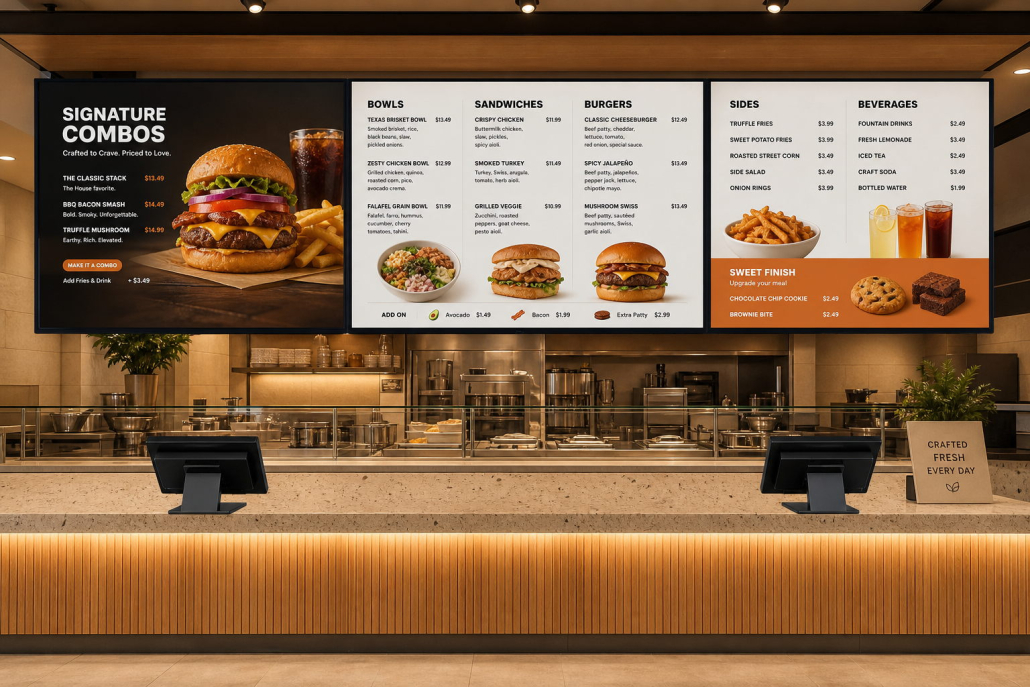
When quick-service restaurants (QSRs), fast-casual cafes, and beverage chains upgrade from static printed boards to commercial digital menu boards, the hardware is only half the battle. You can invest in the most advanced 4K Ultra HD, 700-nit commercial-grade displays from manufacturers like Kontech, but if your on-screen layout is cluttered, unreadable, or disorganized, your investment will fail to deliver its full revenue potential.
Research in consumer psychology demonstrates that fast-food and cafe patrons spend an average of only 60 to 90 seconds scanning a menu board before reaching the ordering counter. If they experience cognitive fatigue or visual confusion, order times lengthen, drive-thru queues stall, and overall customer satisfaction plummets. Conversely, an engineered digital menu layout can guide customer eyes effortlessly, accelerate decision-making, and boost average order value (AOV) by 10% to 25%.
In this comprehensive guide, we unpack the science and art of digital menu board layout design—combining proven menu engineering principles with the technical capabilities of modern commercial displays.
1. The Psychology of Eye-Scanning: The Golden Triangle & F-Pattern
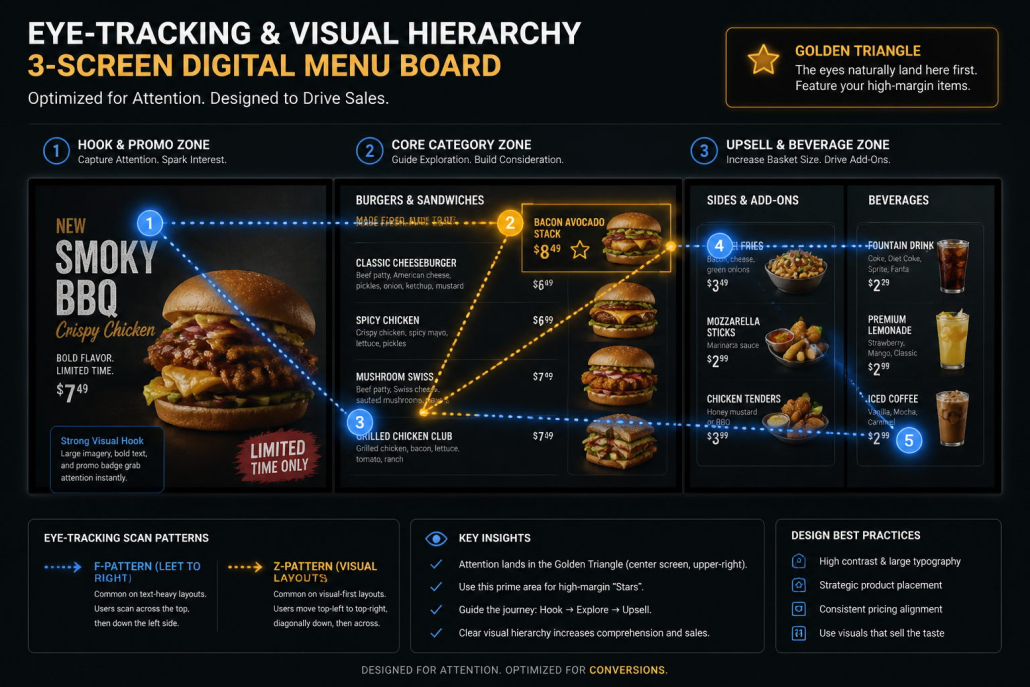
Humans do not read digital menu boards sequentially like a book; they scan in predictable optical patterns governed by visual hierarchy:
Multi-Screen Optical Scanning Flow (3-Screen Overhead Array):
┌─────────────────────────┬─────────────────────────┬─────────────────────────┐
│     SCREEN 1: HOOK      │    SCREEN 2: CORE       │    SCREEN 3: FINISH     │
│  [Hero Promo / Combos]  │  [Entrees / Signatures] │  [Sides / Drinks / Add] │
│                         │                         │                         │
│   (1) START EYE SCAN ───┼───► (2) GOLDEN TRIANGLE ┼───► (3) IMPULSE UPSELL  │
│            ▼            │            ▼            │            ▼            │
│      LTO Video Motion   │      High-Margin Stars  │      Dessert / Upgrades │
└─────────────────────────┴─────────────────────────┴─────────────────────────┘
A. The Golden Triangle Rule
Eye-tracking studies in hospitality reveal that customer gaze lands first on the center of the primary display, moves diagonally to the upper-right quadrant, and then travels to the upper-left corner.
- Actionable Layout Tip: Position your highest-margin “star” items (e.g., your signature gourmet burger combo, specialty seasonal beverage, or chef’s special) in the top-center and upper-right zones. Never waste this prime optical real estate on low-margin staples or generic operational notices.
B. The Rule of 5 (Preventing Information Overload)
The single biggest mistake in digital menu board design is attempting to cram every single SKU from a 40-item printed menu onto one screen. When fonts shrink below legible thresholds, customers step closer, squint, and take longer to order.
- Actionable Layout Tip: Restrict each category column to no more than 4 to 6 items. Use negative space (whitespace) generously. Whitespace is not wasted space; it provides optical breathing room that directs the human eye straight toward high-value choices.
2. Typography & Readability at a Distance
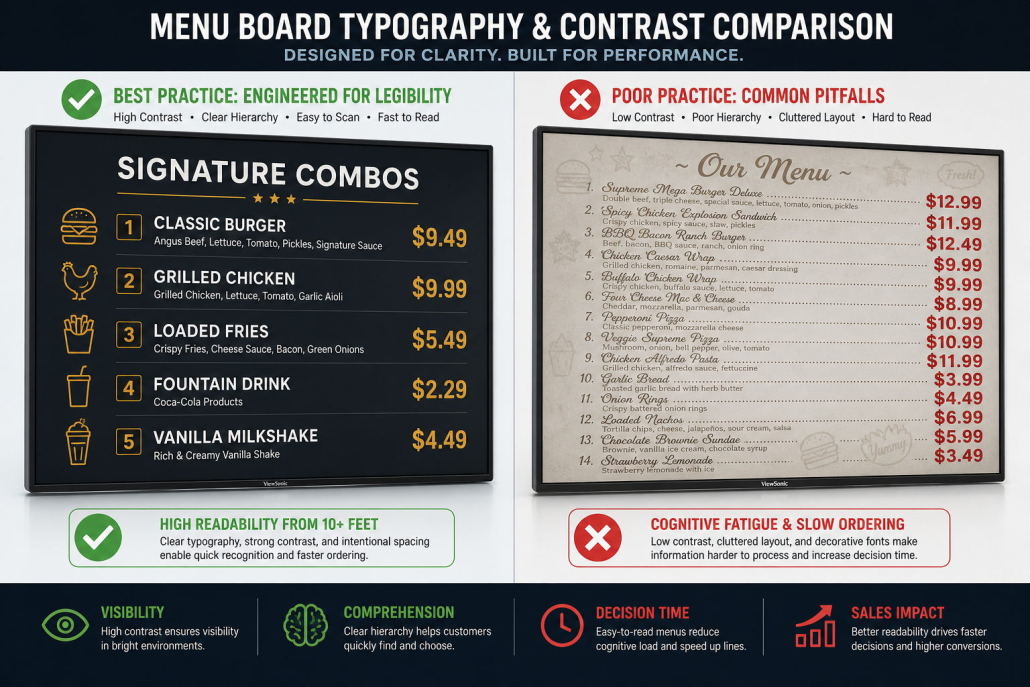
A digital menu board is viewed from a distance of 6 to 15 feet (2 to 5 meters) in indoor walk-up lines, and 10 to 20 feet in drive-thru lanes. Typography must be engineered for instantaneous legibility:
Typography Rules for Digital Menus:
- Stick to Clean Sans-Serif Typefaces: Avoid intricate serif, decorative script, or gothic typefaces. Clean, modern geometric sans-serif fonts such as Helvetica Neue, Montserrat, Poppins, Roboto, or Open Sans maintain crisp edge definition on 4K LCD panels.
- Limit Font Weights to Two or Three Variations: Use Bold for category headings, Medium/Semi-Bold for item titles, and Regular for brief descriptions.
- De-Emphasize Dollar Signs: Research from Cornell University shows that omitting or diminishing currency symbols reduces the psychological “pain of paying.” Display prices cleanly as
12.5or$12in a lighter or equal font weight rather than oversized bold numbers.
3. Color Contrast, Food Psychology, and Display Brightness Matching
Color choices on a digital menu board dictate both legibility and physiological appetite response:
A. The 60-30-10 Color Rule
- 60% Dominant Base: Clean neutral background (deep slate charcoal, warm off-white, or dark espresso). A dark background provides superior contrast for bright food imagery, while light backgrounds work well in airy daytime cafes.
- 30% Secondary Structure: Brand color used for category banners, borders, and structural dividing lines (e.g., forest green, navy, or warm terracotta).
- 10% Accent Call-to-Action: High-vibrancy accent color (golden amber, bright coral, or warm yellow) used exclusively to highlight limited-time offers, “Best Seller” badges, or combo upgrade tags.
B. The Impact of Commercial Screen Brightness (700 Nits vs. 250 Nits)
Many restaurant owners make the mistake of testing their menu layout on a desktop monitor in a dim office. When deployed in a brightly illuminated restaurant filled with 1,000-lux halogen downlights:
- Low-brightness consumer TVs (250–350 nits) suffer from severe glare, washing out dark colors into gray fog.
- Kontech 700-nit commercial displays with anti-glare (AG) surface treatments punch through ambient lighting, preserving deep blacks, saturated food colors, and crisp white text.
4. Multi-Screen Zoning Architecture (The 3-Screen Strategy)
For quick-service restaurants deploying a horizontal 3-screen or 4-screen array above the counter, each screen must serve a distinct tactical purpose:
Tactical Zoning Blueprint (3-Screen Horizontal Array):
┌───────────────────────────┬───────────────────────────┬───────────────────────────┐
│     SCREEN 1 (LEFT)       │     SCREEN 2 (CENTER)     │     SCREEN 3 (RIGHT)      │
│  "THE APPETITE HOOK"      │    "THE CORE ENGINE"      │    "THE TICKET BUILDER"   │
├───────────────────────────┼───────────────────────────┼───────────────────────────┤
│ • 4K Hero Food Video (60%)│ • Main Burgers / Bowls    │ • Side Dishes & Snacks    │
│ • Limited-Time Offer (LTO)│ • Combo Options & Sizing  │ • Beverages & Shakes      │
│ • Daily Specials & Bundles│ • Clear Calorie Counts    │ • Desserts & Add-Ons      │
└───────────────────────────┴───────────────────────────┴───────────────────────────┘
Best Practices for Multi-Screen Synchronous Canvasing (Video Takeovers)
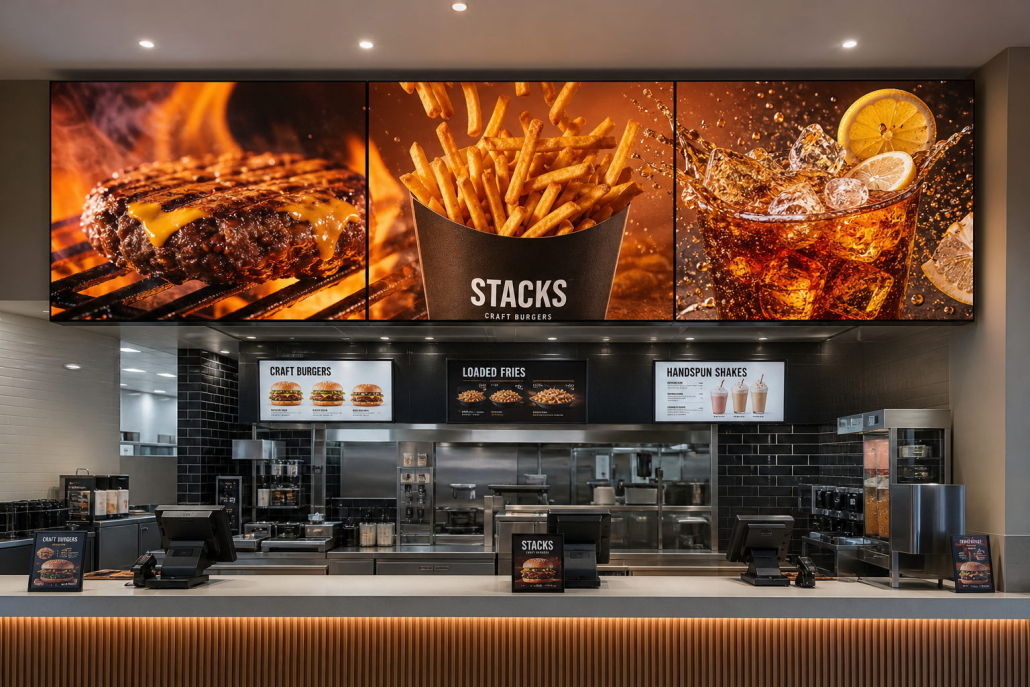
- The 10-Minute Video Takeover: Every 10 to 15 minutes, program your cloud CMS to trigger a synchronized 8-second video takeover across all screens. A sizzling artisan burger flips on Screen 1, a cascade of golden crispy fries rolls across Screen 2, and a refreshing iced beverage pours on Screen 3.
- The Reset: After 8 seconds, the screens seamlessly snap back to their structured menu layout. This dynamic takeover captures the attention of everyone in the room without disrupting the ordering flow.
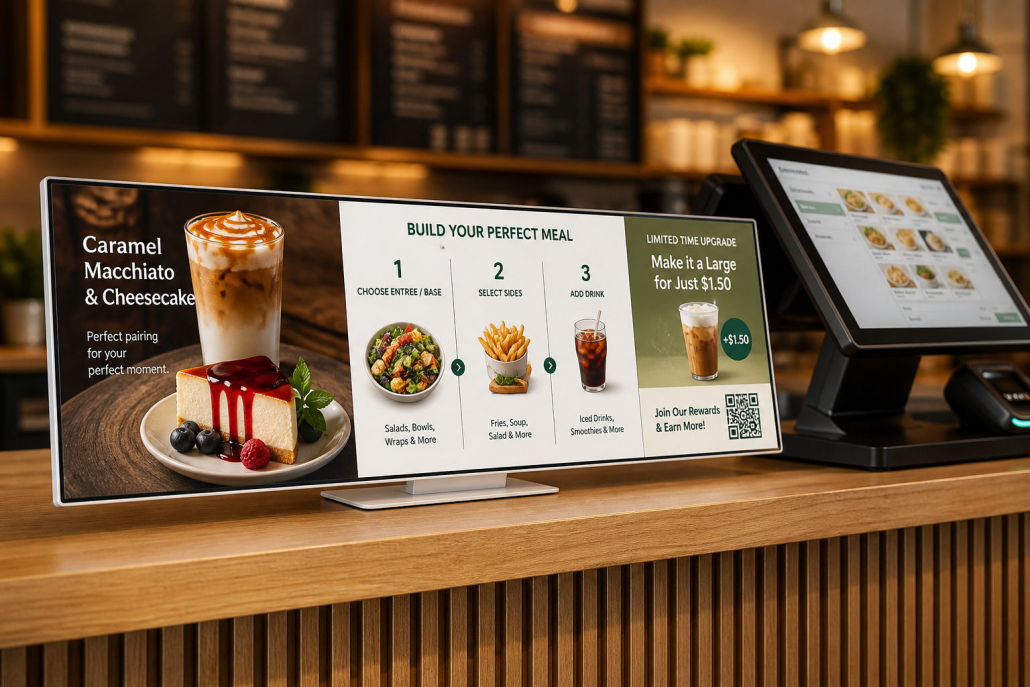
5. Designing for Specialized Screen Formats: 21:9 Ultrawide Desktop Displays
In modern bubble tea shops, compact bakeries, and boutique cafes, overhead wall space is often restricted by architectural ceilings or extraction ducts. Countertop ordering spaces require specialized screen formats:
- The 29-Inch 21:9 Stretched Bar Format (Kontech Desktop Series):
- Featuring a panoramic 2560×1080 2K resolution with an active display area of 672.8 × 283.8 mm, this low-profile screen sits elegantly beside the cash register.
- Layout Blueprint for 21:9 Displays: Divide the screen into three distinct horizontal functional modules:
- Module 1 (Left 35%): Visual Hero Promotion (looping 4K animation of the seasonal signature drink).
- Module 2 (Center 40%): Step-by-Step Customization Matrix (Step 1: Base Tea ➔ Step 2: Sweetness & Ice ➔ Step 3: Toppings).
- Module 3 (Right 25%): Checkout Upsell & Loyalty QR Code (Scan to earn points or add a pastry for $1.50).
6. Video & Motion Discipline: When Animation Sells vs. When It Distracts
Motion attracts the human eye four times faster than static graphics, but excessive animation ruins a menu board:
- DO: Use subtle cinemagraphs—steam gently rising from fresh hot coffee, glistening moisture drops on a chilled beverage cup, or cheese slowly stretching on a warm pizza.
- DO NOT: Flash text, spin prices, or fly category banners across the screen. If a customer is trying to read the price of a chicken sandwich and the text suddenly flips or scrolls off-screen, it creates acute frustration.
- The Motion Golden Rule: Motion should be confined to the Hero Product Imagery zone (15% to 20% of screen area), while menu names, ingredients, and prices remain 100% static and locked in place.
7. Common Digital Menu Board Design Mistakes to Avoid
8. Frequently Asked Questions (FAQ)
Q1: What resolution should my digital menu board graphics be?
A: Always design your graphic templates in native 4K Ultra HD (3840×2160) for standard 16:9 screens, or 2560×1080 for 21:9 ultrawide screens. Even if viewed from a distance, 4K resolution guarantees that small ingredient text, calorie notations, and price fractions remain razor-sharp without pixelation.
Q2: Should prices be listed with dollar signs and decimals?
A: Best practice in hospitality menu engineering recommends omitting currency symbols (e.g., 9.5 instead of $9.50) or using a smaller, non-bold currency sign. This subtly minimizes price resistance while maintaining clean typographical alignment.
Q3: How many screens does my restaurant actually need?
A: A general rule of thumb:
- 1 Screen: Cafes, bubble tea shops, or kiosks with under 15 SKUs.
- 2 Screens: Quick-casual concepts with 15–25 SKUs (Screen 1: Combos & Mains; Screen 2: Sides, Drinks, Desserts).
- 3 to 4 Screens: Comprehensive QSRs with 25–40+ SKUs, dedicated breakfast/lunch menus, and multi-category offerings.

