What hardware and software does a digital signage system require?
When business owners, retail operators, and IT managers decide to deploy digital signage, they often start with a simplistic assumption: “We just need to buy a TV, plug in a USB flash drive with our pictures, and mount it on the wall.”
Within weeks, that consumer-grade approach collapses into costly operational chaos: screens wash out in daylight, consumer TVs burn in after 12 hours of continuous operation, staff waste hours manually swapping USB drives across multiple locations, and unmanaged Wi-Fi connections cause frequent black screens.
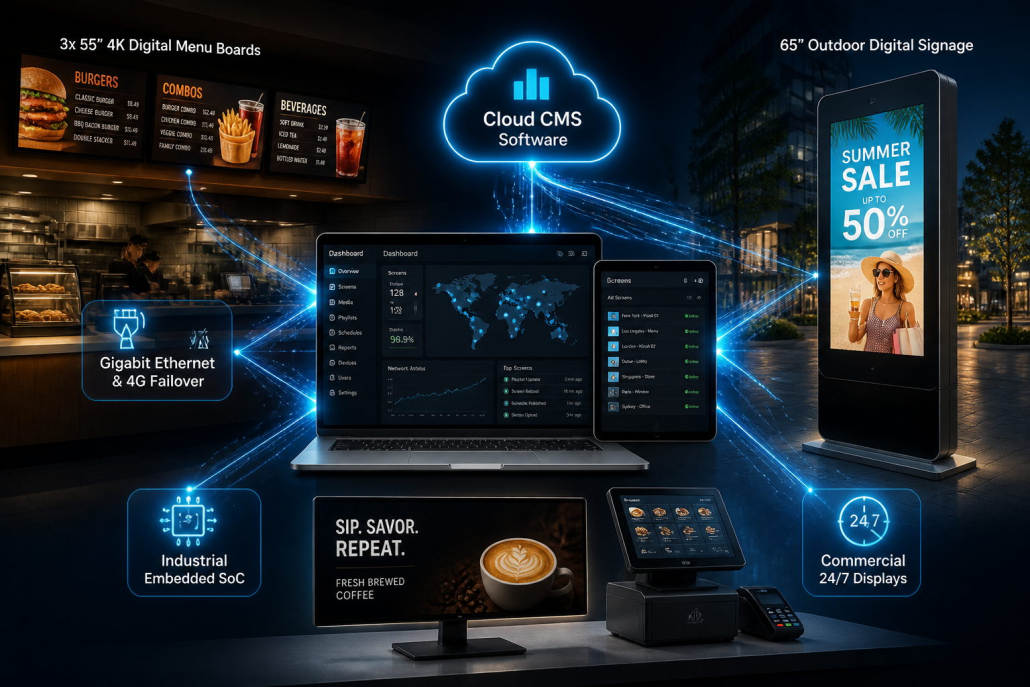
A professional, enterprise-grade digital signage network is not just a screen—it is an integrated ecosystem consisting of four interdependent pillars:
- Display Hardware (The Visual Layer): Commercial-grade panels engineered for continuous operation, high luminance, and specific environmental exposures.
- Media Players & Computing (The Processing Layer): Embedded System-on-Chip (SoC) architectures, external industrial media boxes, or modular OPS slot-in PCs.
- Content Management Software / CMS (The Control Layer): Cloud-based SaaS platforms or on-premises servers governing layout design, dayparting schedules, and remote device monitoring.
- Network, Power & Mounting Infrastructure (The Foundation Layer): Secure high-bandwidth connectivity, clean surge-protected power, and structural VESA mounting hardware.
Drawing upon Kontech’s commercial display manufacturing standards (commercial 700-nit indoor screens, 2,000–3,500 nit window & outdoor displays, Android 9.0 SoC computing, and modular IP65 enclosures), this comprehensive checklist clarifies every single hardware, software, and infrastructure component required to launch a reliable digital signage network.
Digital Signage System Architecture at a Glance
ENTERPRISE DIGITAL SIGNAGE SYSTEM TOPOLOGY:
┌────────────────────────────────────────────────────────────────────────┐
│ [CONTENT CREATION & CLOUD CMS]                                         │
│ Cloud SaaS Platform / On-Premise Server (Layout, Schedule, Playlist)   │
└───────────────────────────────────┬────────────────────────────────────┘
                                    │ Encrypted Internet (HTTPS/WSS)
                                    ▼
┌────────────────────────────────────────────────────────────────────────┐
│ [NETWORK INFRASTRUCTURE]                                               │
│ Gigabit Ethernet (RJ45) / Dual-Band Wi-Fi (2.4G/5G) / 4G Cellular Router│
└───────────────────────────────────┬────────────────────────────────────┘
                                    │ Local IP Distribution
                                    ▼
┌────────────────────────────────────────────────────────────────────────┐
│ [MEDIA PLAYERS & PROCESSING COMPUTING]                                 │
│ ┌──────────────────────┐ ┌──────────────────────┐ ┌──────────────────┐ │
│ │ Integrated SoC       │ │ External Industrial  │ │ Modular OPS Slot │ │
│ │ (Android Quad-Core)  │ │ Box (Windows/Linux)  │ │ PC (Intel i5/i7) │ │
│ └──────────────────────┘ └──────────────────────┘ └──────────────────┘ │
└───────────────────────────────────┬────────────────────────────────────┘
                                    │ Video Signal (Internal / HDMI 2.1)
                                    ▼
┌────────────────────────────────────────────────────────────────────────┐
│ [COMMERCIAL DISPLAY PANELS & ENCLOSURES]                               │
│ ┌───────────────────┐ ┌────────────────────┐ ┌───────────────────────┐ │
│ │ Indoor 700 Nits   │ │ Window 2,500 Nits  │ │ Outdoor IP65 Totem    │ │
│ │ 24/7 AG Panels    │ │ High-TNI Panels    │ │ IK10 5mm Glass Kiosk  │ │
│ └───────────────────┘ └────────────────────┘ └───────────────────────┘ │
└───────────────────────────────────┬────────────────────────────────────┘
                                    │ Physical & Electrical Foundation
                                    ▼
┌────────────────────────────────────────────────────────────────────────┐
│ [INFRASTRUCTURE: MOUNTS, POWER & CABLING]                              │
│ Ceiling Rails / Heavy-Duty VESA Brackets / Clean PDU / Surge Protection│
└────────────────────────────────────────────────────────────────────────┘
Component 1: Commercial Display Hardware (The Visual Layer)
The most visible component of your deployment is the display panel. Choosing between consumer televisions and commercial displays is the single most critical decision in your project.
Consumer TV vs. Commercial Digital Signage Display:
- Daily Operating Duty Cycle: Consumer TVs are engineered for 6 to 8 hours of daily use. Commercial displays (like Kontech’s indoor and outdoor series) feature heavy-duty power supplies, industrial capacitors, and advanced thermal dissipation designed for 16/7 or continuous 24/7 duty cycles.
- Luminance (Nits): Consumer TVs output 250 to 350 nits. Indoors under fluorescent lighting or near glass windows, their picture appears washed out and dull. Commercial displays deliver 700 nits (indoor commercial), 2,000 to 2,500 nits (storefront windows), and up to 3,500 nits (direct outdoor sunlight).
- Orientation Versatility: Consumer TVs only operate in landscape mode; mounting them vertically in portrait traps heat at the top edge, causing premature panel failure. Commercial displays support both portrait and landscape orientations natively.
- Anti-Glare (AG) & Anti-Reflective (AR) Glass: Commercial panels incorporate matte anti-glare coatings or optical 5mm tempered AR glass (reducing reflections by up to 98%), preventing mirror-like reflection of ambient lighting.
Commercial Display Selection Matrix by Environment:
┌────────────────────┬─────────────────┬──────────────────┬────────────────────────┐
│ APPLICATION        │ REQUIRED NITS   │ PROTECTION LEVEL │ RECOMMENDED HARDWARE   │
├────────────────────┼─────────────────┼──────────────────┼────────────────────────┤
│ Indoor Retail/Lobby│ 450 – 700 Nits  │ Standard Chassis │ 43"–65" 4K Commercial  │
│ Fast Food Counters │ 700 Nits        │ Anti-Grease / AG │ Multi-Screen Array     │
│ Storefront Windows │ 2,000–3,000 Nits│ High-TNI Panel   │ Window-Facing Screen   │
│ Outdoor Plaza/QSR  │ 2,500–3,500 Nits│ IP65 / IK10 Glass│ Outdoor Totem / Kiosk  │
│ Bar / Coffee Desk  │ 500 – 700 Nits  │ Compact Chassis  │ 29" 21:9 Stretched Bar │
└────────────────────┴─────────────────┴──────────────────┴────────────────────────┘
Component 2: Media Players & Processing Computing (The Brain)
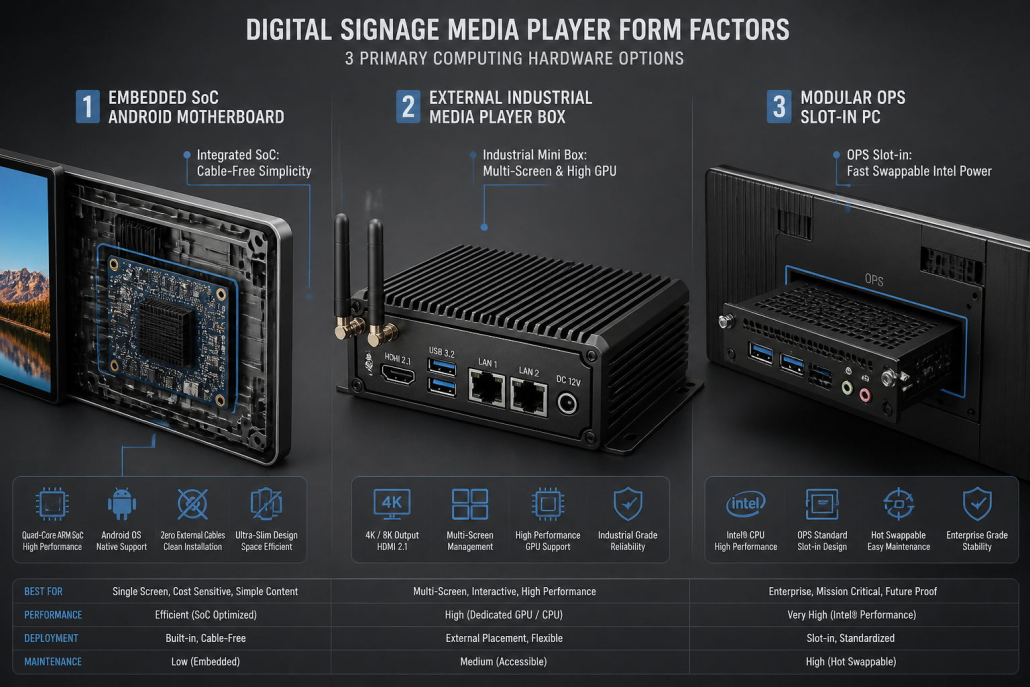
A commercial display requires a media player to render graphics, decode 4K video, execute transition scripts, and store local cached playlists. There are three primary computing form factors in commercial AV:
1. Embedded System-on-Chip (SoC) / All-in-One Displays
Modern commercial displays integrate the computing engine directly into the display motherboard—typically a high-performance Quad-Core ARM Cortex processor (such as Cortex-A35 with Mali-G31 GPU), 2GB RAM, and 16GB eMMC storage running Android.
- Advantages: No external player box, no hanging HDMI cables, single power cord installation, zero external hardware clutter, and lowest overall hardware CAPEX.
- Ideal For: Fast food menu boards, retail boutique displays, corporate communications, and standard digital posters.
2. External Industrial Media Player Box
A standalone, ruggedized mini-PC housed in an extruded aluminum fanless chassis, connected to the display via HDMI 2.0/2.1 and controlled via RS-232 or IP.
- Operating Systems: Windows 10/11 IoT Enterprise, Linux (Ubuntu), or dedicated Android industrial boxes.
- Advantages: Superior computing muscle (discrete GPUs, Intel Core processors) capable of driving multi-screen video walls, complex real-time 3D interactive graphics, and multi-sensor inputs.
- Ideal For: High-performance interactive wayfinding kiosks, multi-display canvas splicing, and enterprise networks with strict corporate IT Windows policies.
3. Modular OPS (Open Pluggable Specification) Slot-in PCs
OPS is a standardized Intel form factor where a compact computer module slides directly into an internal rear slot of compatible commercial displays.
- Advantages: Combines the clean, cable-free aesthetic of an embedded SoC with the raw computing power and easy field-serviceability of an external PC.
Media Player Form Factor Comparison:
┌──────────────────────┬──────────────────────┬──────────────────────┐
│ EMBEDDED SOC (SMART) │ EXTERNAL MINI BOX    │ MODULAR OPS SLOT-IN  │
├──────────────────────┼──────────────────────┼──────────────────────┤
│ • Integrated in LCD  │ • Separate Box       │ • Slide-In Module    │
│ • Zero Extra Cables  │ • Needs HDMI & Power │ • Zero Extra Cables  │
│ • Android OS         │ • Windows/Linux/And. │ • Windows/Linux OS   │
│ • Low Power (5W–10W) │ • Higher Power (35W+)│ • High Power (45W+)  │
│ • Best for 90% Signs │ • Complex Video Wall │ • Heavy Touch / 3D   │
└──────────────────────┴──────────────────────┴──────────────────────┘
Component 3: Content Management System / CMS Software (The Control Layer)
Without software, your commercial display is merely a dark piece of glass. A professional Content Management System (CMS) enables remote control, scheduling, and device monitoring across tens, hundreds, or thousands of screens.
Essential Features of an Enterprise Signage CMS:
- Cloud SaaS vs. On-Premises Architecture:
- Cloud SaaS (Recommended for 95% of users): Hosted on AWS, Microsoft Azure, or Google Cloud. Accessible via any web browser. Offers automatic software updates, zero local server maintenance, and seamless multi-location scalability.
- On-Premises Server: Deployed within the client’s private data center behind enterprise firewalls. Required only for high-security environments (banking, military, critical government infrastructure).
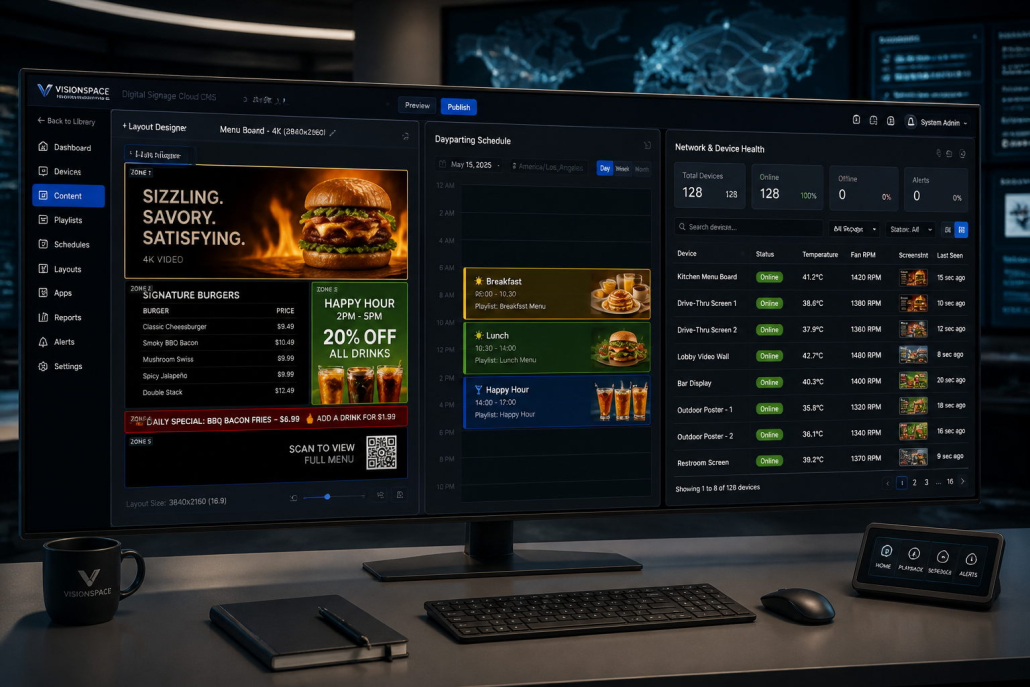
- Multi-Zone Screen Splitting (Layout Designer):
- Enables splitting a single 4K screen into independent zones: full-motion 4K promo video, static price list column, scrolling live ticker text, dynamic QR code widget, and real-time weather feed.
- Dayparting & Calendar Scheduling:
- Automatically switches menu layouts based on time of day (e.g., Breakfast from 06:00 to 10:30, Lunch from 10:30 to 14:00, Happy Hour from 14:00 to 17:00).
- Local Caching & Offline Playback (Mission-Critical):
- A professional signage CMS downloads all media assets and schedule logic directly into the player’s onboard flash memory (eMMC or SSD). If broadband or Wi-Fi drops, the screen continues playing smoothly from local cache without embarrassing blank screens or spinning buffer wheels.
- Remote Device Health Telemetry & Watchdogs:
- Provides live telemetry on internal display temperature, fan RPM, storage capacity, network latency, and remote screenshot proof-of-play. Integrated hardware watchdogs automatically power-cycle frozen players within 60 seconds.
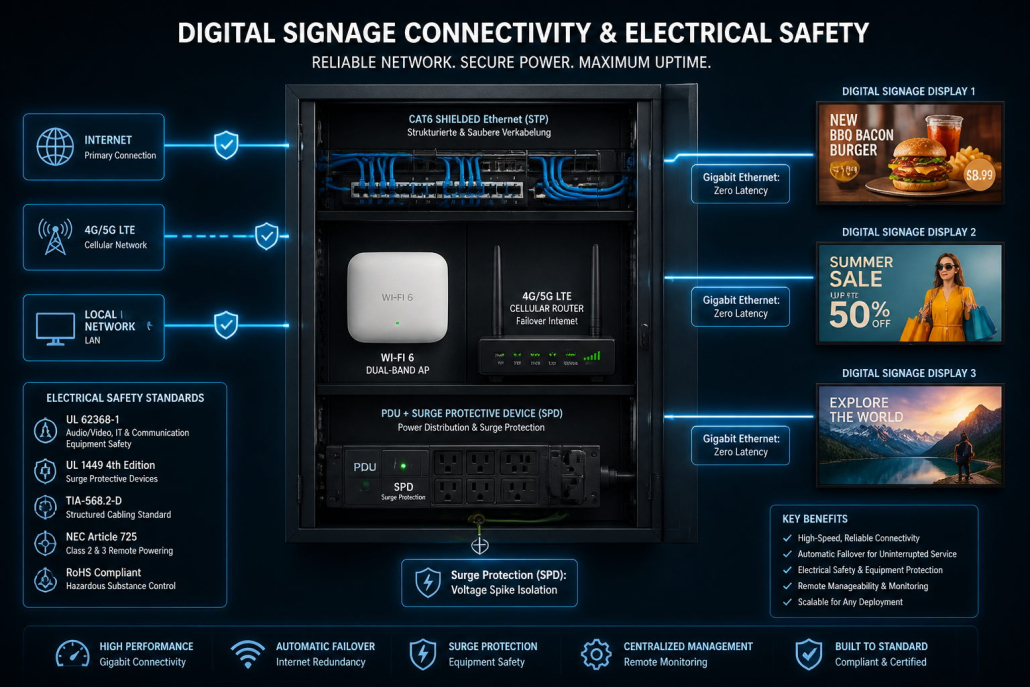
Component 4: Network & Electrical Infrastructure (The Foundation)
Network connectivity and electrical infrastructure are the most frequently underestimated components in digital signage deployments.
1. Network Connectivity Options:
- Hardwired Gigabit Ethernet (RJ45 Cat6) — Gold Standard: Highly recommended for mission-critical deployments (QSR menu boards, DOOH advertising, transportation hubs). Delivers zero radio frequency interference, maximum cybersecurity, and robust throughput for large 4K video distribution.
- Enterprise Dual-Band Wi-Fi (2.4GHz / 5GHz): Suitable for retrofits where running Ethernet cables through historical walls is cost-prohibitive. Requires dual high-gain external antennas and segregated corporate guest VLANs.
- Industrial Cellular 4G/5G Routers: Crucial for outdoor freestanding totems in parking lots, transit bus shelters, or mobile food trucks where fixed broadband is unavailable. Provides instant cloud connectivity via commercial SIM cards.
2. Electrical Power & Protection:
- Clean Dedicated Circuits: Avoid sharing electrical circuits with high-draw inductive kitchen equipment (microwaves, refrigeration compressors, industrial blenders) that create severe electrical noise and voltage dips.
- Surge Protective Devices (SPD): Every outdoor and high-value indoor display must incorporate an industrial surge suppressor (clamping transient voltage spikes from grid fluctuations or lightning strikes).
- Power Distribution Units (PDU): For multi-screen ceiling arrays (3 to 5 menu boards), an overhead cable raceway with a master power distribution strip ensures clean wiring.
Component 5: Mounting Hardware & Physical Accessories
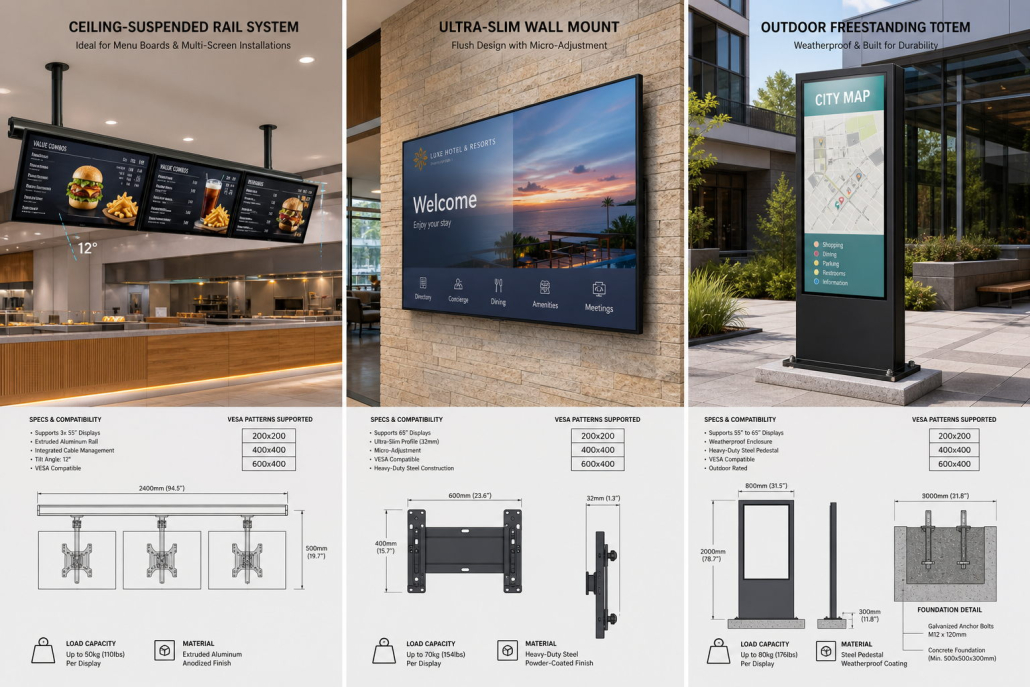
Mounting hardware is a fundamental structural safety requirement. Screens must be securely anchored to building infrastructure while providing ergonomic viewing angles.
Mounting Configuration Checklist:
┌────────────────────────────────────────────────────────────────────────┐
│ MOUNTING TYPE        │ MECHANICAL SPECIFICATION & BEST APPLICATIONS    │
├──────────────────────┼─────────────────────────────────────────────────┤
│ Ceiling-Suspended    │ Telescopic drop poles with horizontal extruded  │
│ Rail System          │ aluminum rail. Uniform 10°–15° downward tilt.   │
│                      │ Ideal for: Fast food counter overhead menus.    │
├──────────────────────┼─────────────────────────────────────────────────┤
│ Ultra-Slim Micro-    │ Heavy-duty steel wall bracket with independent  │
│ Adjust Wall Mount    │ multi-axis micro-adjustment knobs (X, Y, Z).    │
│                      │ Ideal for: Seamless indoor digital posters.     │
├──────────────────────┼─────────────────────────────────────────────────┤
│ Freestanding Totem / │ Integrated heavy-gauge steel pedestal anchored  │
│ Pedestal Kiosk       │ into concrete slab with M12/M16 expansion bolts.│
│                      │ Ideal for: Outdoor plazas, drive-thru lanes.    │
├──────────────────────┼─────────────────────────────────────────────────┤
│ Desktop Integrated   │ Sturdy weighted L-shaped or easel base plate.   │
│ Countertop Stand     │ Ideal for: 21.5" to 29" POS register displays.  │
└────────────────────────────────────────────────────────────────────────┘
Essential Cable & Accessory Checklist:
- Certified VESA Hardware: Standardized M6 or M8 mounting screws matching the display’s VESA pattern (200×200mm, 400×400mm, or 600×400mm).
- High-Speed HDMI 2.0 / 2.1 Cables: Triple-shielded cables with locking connectors (if using external media players).
- Concealed Cable Management: Metal split-loom conduit, rear raceways, and UV-resistant zip ties to achieve a clean “zero-hanging-cable” aesthetic.
- Tamper-Proof Cam Locks: High-security mechanical locks for outdoor and public kiosk access doors.
Complete Digital Signage Equipment Buying Checklist
Use this practical checklist to ensure zero missing components before dispatching installation teams:
Frequently Asked Questions (FAQ)
Q1: Can I run a digital signage screen using just a USB flash drive without an internet connection?
A: Yes. Most commercial displays (including Kontech models) support standalone USB plug-and-play. You can load videos and images onto a USB stick, insert it into the screen, and the embedded media player will loop the content automatically. However, for networks with 3 or more screens or menus that change daily, manually updating USB sticks via ladders is operationally impractical; a cloud CMS saves hundreds of hours of manual labor.
Q2: What is the main operational difference between an embedded SoC screen and an external media player box?
A: An embedded SoC integrates the computer board inside the display chassis, eliminating external boxes, extra HDMI cables, and external power adapters. It handles 90% of standard signage tasks (video loops, digital menus, price tables) with maximum reliability and lowest cost. External player boxes are required for complex workloads: multi-screen canvas video walls, intensive 3D wayfinding rendering, or organizations whose corporate cybersecurity policies mandate Windows Enterprise domains.
Q3: What happens to my digital signage content if the store’s Wi-Fi or broadband goes down?
A: With an enterprise-grade signage CMS and industrial media player, nothing happens—the screen continues playing normally. Modern signage software downloads all images, video files, and scheduling rules into local onboard flash storage (eMMC or SSD). The internet connection is only used to download new updates or send health telemetry; a broadband outage will never cause a black screen or playback interruption.

