
How to Reduce Maintenance Costs for Outdoor Digital Signage Projects
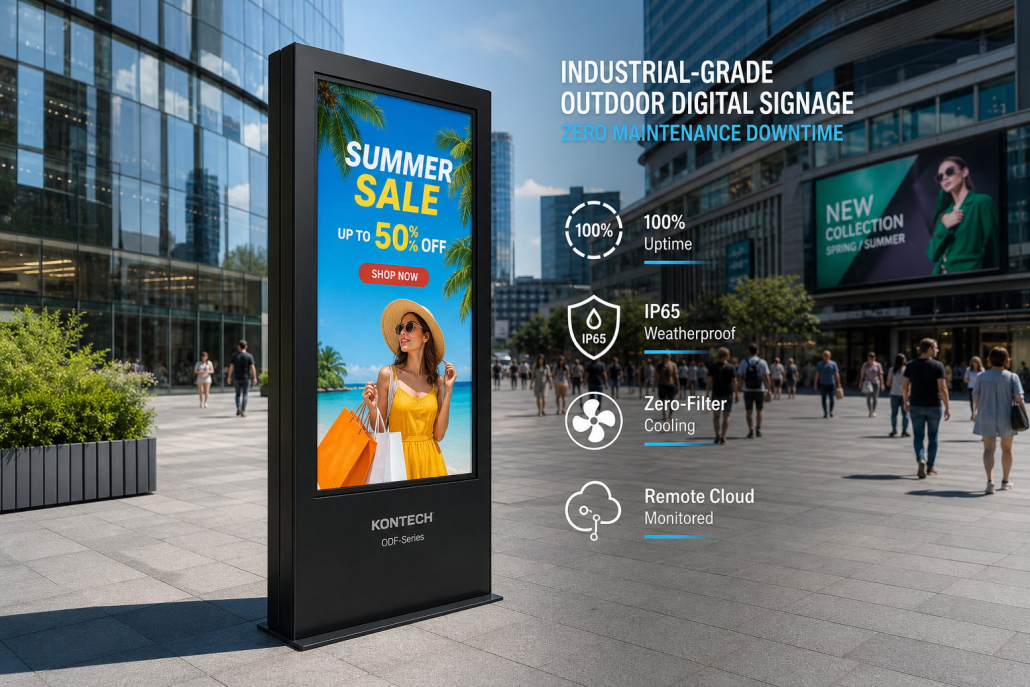
Outdoor digital signage has become an essential communication and advertising tool for retail stores, restaurants, shopping malls, transportation hubs, public spaces, and commercial facilities. From outdoor advertising screens to drive-thru menu boards and street-facing digital displays, these solutions help businesses deliver dynamic content and attract customer attention.
However, outdoor display projects often involve more than the initial equipment investment. Long-term maintenance, unexpected repairs, component replacement, labor costs, and operational downtime can significantly increase the total cost of ownership (TCO).
For project owners, system integrators, distributors, and commercial display buyers, reducing maintenance costs should be a key consideration from the beginning of a project—not something addressed only after equipment failures occur.
So, how can businesses reduce outdoor digital signage maintenance costs while maintaining reliable performance?
Here are eight practical strategies.
1. Choose Outdoor Displays Designed for Long-Term Operation
One of the most effective ways to reduce maintenance costs is to select displays specifically engineered for outdoor environments.
Indoor commercial displays are generally not designed to withstand prolonged exposure to sunlight, rain, dust, temperature fluctuations, and other outdoor conditions. Using indoor equipment outdoors may result in overheating, moisture-related failures, reduced screen visibility, and frequent repairs.
When selecting outdoor digital signage, consider the following features:
- Weather protection: Choose an enclosure with an appropriate IP protection rating based on the installation environment.
- High brightness: Select a screen with sufficient brightness for direct sunlight or strong ambient light.
- Industrial-grade components: Use reliable LCD panels, power supplies, and electronic components designed for commercial operation.
- Corrosion resistance: Consider suitable enclosure materials and surface treatments for humid, coastal, or polluted environments.
- Continuous operation capability: Ensure the display is designed for the intended daily operating hours.
A display with a higher initial purchase price may offer better long-term value if it reduces repair frequency and replacement costs.
2. Prioritize Thermal Management and Heat Dissipation
Heat is one of the major factors affecting the lifespan and stability of outdoor digital signage.
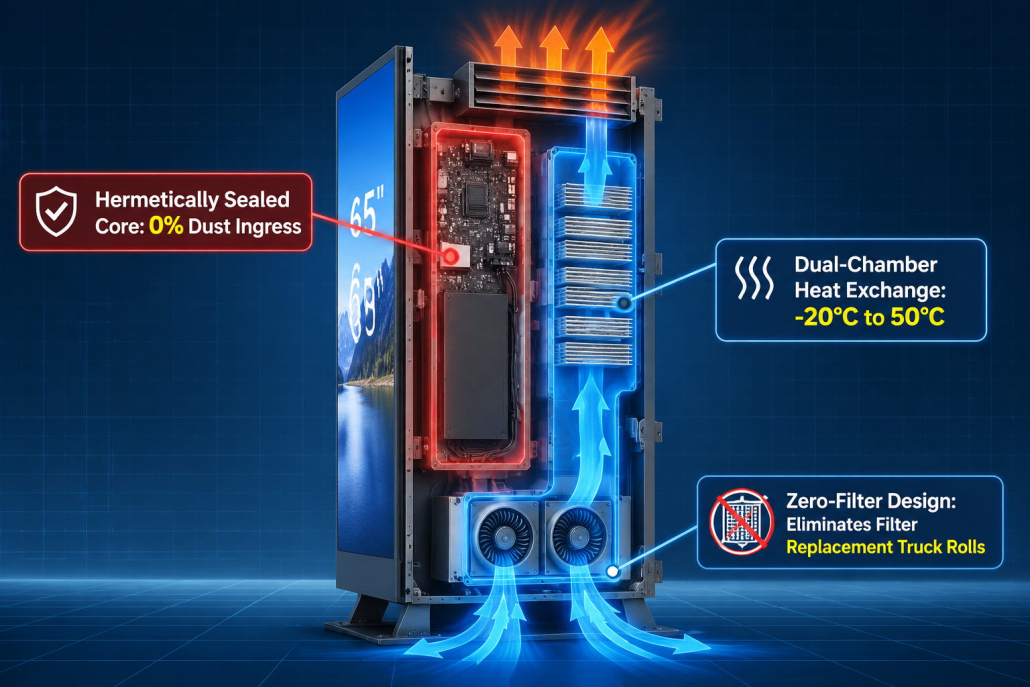
Outdoor displays are exposed to direct sunlight and high ambient temperatures. Internal components also generate heat during operation. Without effective thermal management, excessive temperatures can accelerate component aging, reduce system stability, and increase the risk of failure.
To reduce maintenance costs, pay attention to the following:
Choose an appropriate cooling design
Depending on the display structure and operating environment, thermal management may involve:
- Fan-based active cooling
- Temperature-controlled ventilation
- Fanless aluminum housing
- Optimized internal airflow
- Heat-dissipation structures designed for continuous operation
 Avoid poorly designed enclosures
A sealed enclosure does not automatically provide effective heat management. The thermal design must balance environmental protection and internal temperature control.
Check the operating temperature range
Make sure the selected display supports the expected ambient temperature range at the installation site.
For outdoor projects in hot climates, effective heat dissipation can help reduce thermal stress and improve long-term operating stability.
3. Select the Right IP Protection Rating for the Installation Environment
Water and dust intrusion can cause serious damage to outdoor display systems, including corrosion, short circuits, and electronic component failure.
An appropriate IP rating helps buyers evaluate the level of enclosure protection.
For example:
- IP55: Provides dust protection and protection against water jets under specified test conditions.
- IP65: Provides dust-tight protection and protection against water jets under specified test conditions.
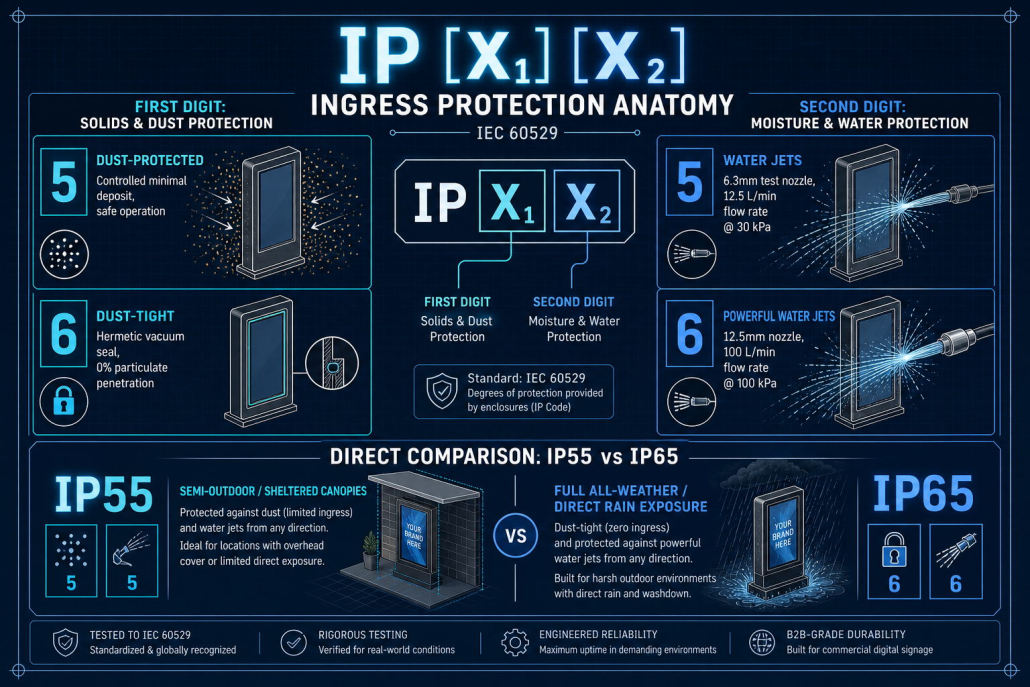 It is important to understand that the second digit is the same for IP55 and IP65. Therefore, IP65 offers a higher level of dust protection, but it does not provide a higher water-protection level than IP55.
The right rating depends on the actual installation conditions, including exposure to rain, wind-driven dust, cleaning procedures, and the possibility of water accumulation.
Also remember that an IP rating does not automatically guarantee protection against UV exposure, corrosion, impact, extreme temperatures, or poor installation practices.
Before purchasing, request relevant test reports or technical documentation from the manufacturer to verify the claimed protection level.
4. Use Remote Monitoring and Centralized Content Management
For projects involving multiple outdoor digital signage units, manual inspection and on-site content updates can create substantial labor costs.
A centralized content management system (CMS) can help operators manage displays remotely.
Depending on the system’s capabilities, remote management may include:
- Uploading and scheduling advertising content
- Managing multiple displays from one platform
- Checking device connection status
- Monitoring playback status
- Restarting or adjusting devices remotely
- Organizing displays by location or project
- Identifying devices that require technical attention
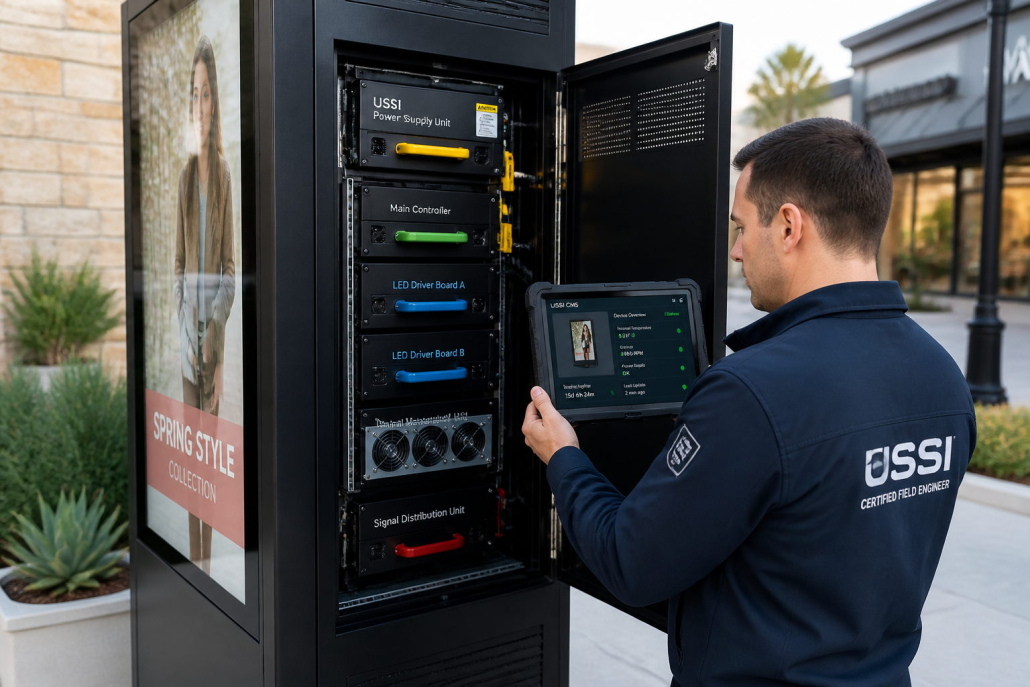 Remote monitoring does not eliminate the need for physical maintenance. However, it can reduce unnecessary site visits, improve troubleshooting efficiency, and help operators identify potential problems earlier.
For large-scale digital signage networks, centralized management can make daily operations more efficient and easier to control.
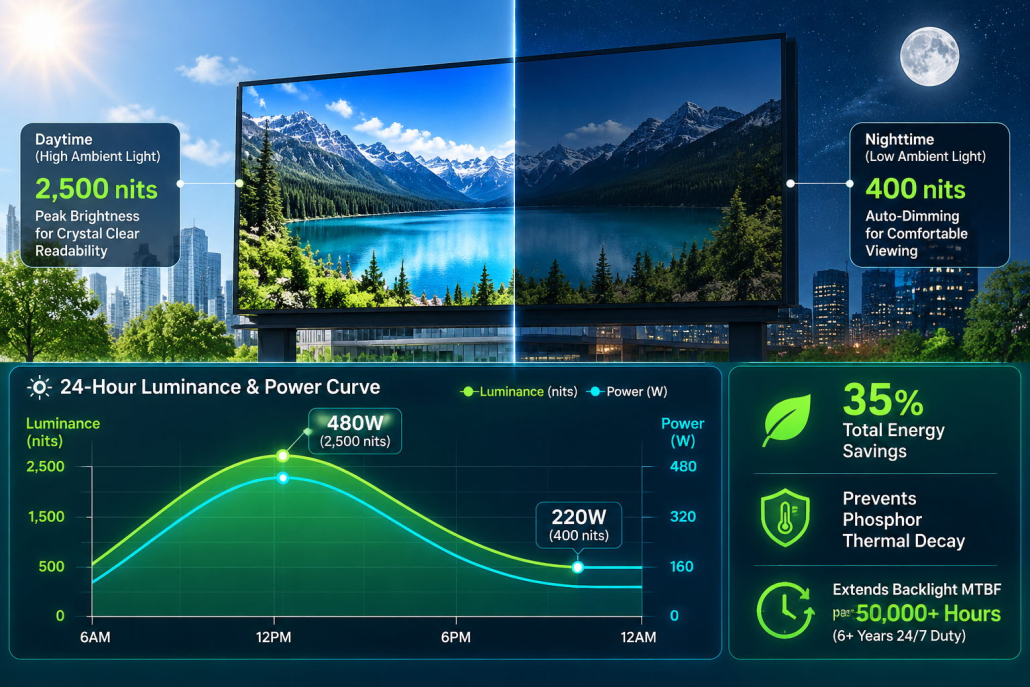
5. Intelligent Ambient Light Auto-Dimming to Extend Backlight MTBF
Running an outdoor screen at its maximum luminance of 2,500 to 3,500 nits continuously 24 hours a day is one of the fastest ways to destroy your hardware:
- Continuous maximum current accelerates thermal decay of LED phosphors, cutting backlight operational lifespan in half (from 50,000 hours down to less than 25,000 hours).
- It consumes massive electrical wattage, inflating power bills by thousands of dollars per unit.
- At night, 2,500 nits causes blinding glare and light pollution, triggering municipal compliance complaints.
Dynamic Luminance & Power Curve Across 24-Hour Cycle:
 Brightness (Nits)
 3,000 ┼               ┌──────────────┐ (2,500 Nits Midday Sun)
 2,000 ┼              ╱                ╲
 1,000 ┼             ╱                  ╲
   400 ┼────────────┘                    └──────────── (400 Nits Night)
       00:00        06:00    12:00      18:00        24:00
       [---- 35% ENERGY SAVINGS ----]   [-- EXTENDS MTBF >50,000 HRS --]
The Automatic Dual-Benefit of Optical Sensors:
Kontech displays integrate an industrial ambient optical light sensor that continuously samples outdoor illuminance:
- Extends Backlight Lifespan Past ≥50,000 Hours: Lowering driving current during dawn, dusk, cloudy weather, and nighttime reduces thermal stress, ensuring backlights run reliably for over 5 to 6 years of uninterrupted 24/7 duty.
- Slashes Energy Consumption by 30% to 40%: A 65-inch outdoor LCD drawing 480W at peak daylight drops to approximately 200W–250W at night. Over 5 years, this saves approximately 800to1,200 per display in utility costs.
6. Establish a Preventive Maintenance Schedule
 6. Establish a Preventive Maintenance Schedule
Waiting until a display fails before performing maintenance can lead to higher repair costs and unexpected downtime.
Preventive maintenance helps identify potential issues before they become serious problems.
A practical maintenance plan may include the following tasks:
| Maintenance Task | Recommended Check |
|---|---|
| Screen surface | Clean dust, dirt, and stains using suitable materials |
| Enclosure | Check for visible damage, loose parts, and aging seals |
| Cooling system | Inspect fans, ventilation paths, and heat-dissipation areas |
| Electrical connections | Check cables, connectors, and power connections |
| Display performance | Check brightness, image quality, and playback status |
| Mounting structure | Inspect brackets, fasteners, and structural stability |
| Software system | Check firmware, CMS connectivity, and scheduled content |
The maintenance frequency should depend on the installation environment, operating hours, and manufacturer’s recommendations.
For example, displays installed in coastal areas, dusty locations, or high-traffic public spaces may require more frequent inspections.
Always follow the manufacturer’s cleaning and maintenance instructions. Avoid using unsuitable chemicals or high-pressure water that could damage seals, coatings, or electronic components.
7. Standardize Spare Parts and Plan for Long-Term Supply
For projects involving multiple displays or installations across different locations, spare parts management is an important part of cost control.
Using different display models or components across one project can increase inventory complexity and make repairs more difficult.
To improve maintenance efficiency:
- Standardize display models where practical.
- Confirm the availability of key replacement components.
- Establish a spare-parts list based on project scale and operating conditions.
- Clarify warranty terms and technical support responsibilities.
- Confirm product lifecycle and long-term supply arrangements with the manufacturer.
Working with a manufacturer that can provide consistent product specifications, replacement parts, and technical support can help reduce long-term operational risks.
For distributors and system integrators, this is especially important when supporting customers across multiple regions.
8. Evaluate Total Cost of Ownership Instead of Only Purchase Price
A common mistake in outdoor digital signage procurement is choosing equipment based mainly on the lowest initial price.
However, the real cost of a project includes much more than the purchase price.
A basic total cost of ownership model can be expressed as:
TCO = Initial Equipment Cost + Installation Cost + Energy Cost + Maintenance Cost + Repair and Replacement Cost + Downtime Cost
For example, a lower-priced display may require more frequent repairs, consume more energy, or involve higher labor costs because its components are difficult to access.
A more reliable display with an optimized cooling system, suitable protection rating, modular structure, and remote management capabilities may deliver better long-term value.
When comparing manufacturers, evaluate:
- Product reliability and design
- Brightness and operating performance
- Environmental protection
- Cooling and thermal management
- Serviceability and spare-parts availability
- Warranty coverage
- Technical support
- Expected operating lifespan
The goal is not simply to purchase a cheaper screen, but to build a more reliable and cost-efficient digital signage project.
9. Work with an Experienced Outdoor Digital Signage Manufacturer
The manufacturer plays an important role in determining the long-term maintenance requirements of an outdoor digital signage project.
An experienced manufacturer can help buyers select suitable display configurations based on installation conditions, operating hours, brightness requirements, environmental exposure, and project budget.
Before confirming an order, discuss the following points with your supplier:
- What environmental conditions is the display designed for?
- What IP protection rating is supported by technical documentation?
- How is heat dissipation managed?
- What is the expected operating temperature range?
- Can key components be replaced independently?
- Are spare parts available for long-term maintenance?
- What warranty and technical support are provided?
- Can the manufacturer customize the display for specific project requirements?
Choosing the right manufacturing partner can help reduce design mistakes, improve equipment reliability, and make after-sales support more predictable.
Looking for Reliable Outdoor Digital Signage Solutions?
Kontech specializes in commercial display solutions, including high-brightness outdoor digital signage, outdoor advertising displays, and digital menu boards.
As an outdoor display manufacturer, Kontech supports B2B customers with product customization and OEM/ODM services for different commercial applications.
Whether you are planning a single-location installation or a large-scale digital signage project, our team can help you evaluate suitable display configurations based on your project requirements.
Contact Kontech to discuss your outdoor digital signage project and request a customized solution.
