
IP65 vs IP55 Outdoor Displays: Understanding Weather Protection Ratings
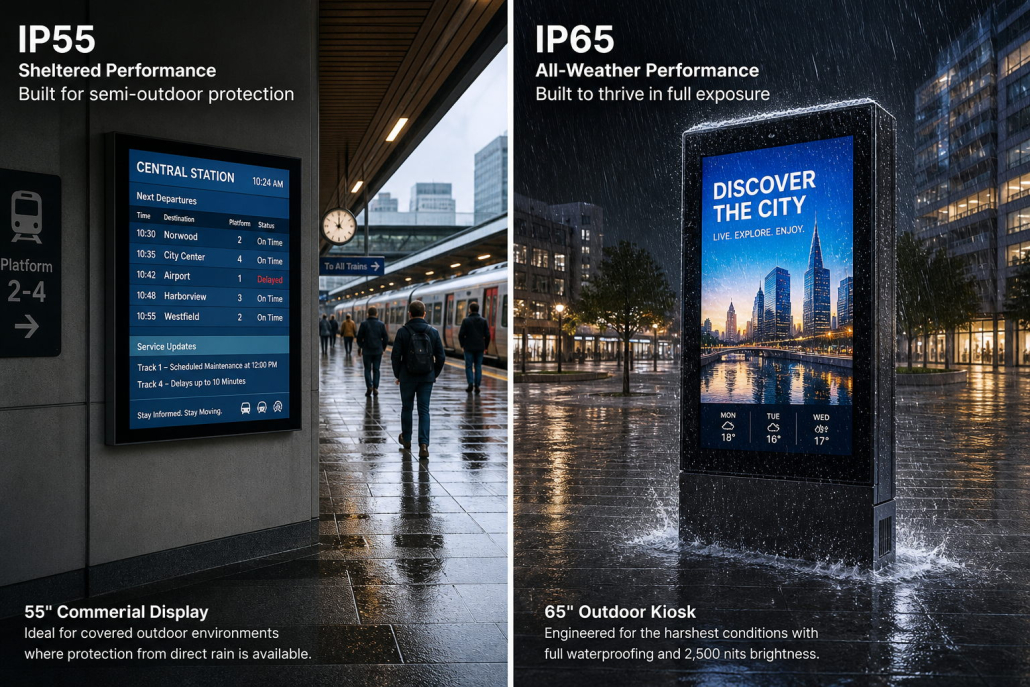 Outdoor digital signage is widely used in retail storefronts, shopping centers, transportation hubs, restaurants, drive-thru lanes, public spaces, and other commercial environments. Unlike indoor displays, outdoor screens must cope with dust, rain, water jets during cleaning, temperature changes, and other environmental challenges.
When choosing an outdoor digital signage display, one specification buyers often compare is the IP rating. Two common ratings are IP55 and IP65. Although they look similar, they provide different levels of protection against dust.
So, what is the difference between IP65 and IP55 outdoor displays? Is IP65 always the better choice? And which rating is suitable for your project?
This guide explains how IP ratings work, compares IP55 and IP65, and outlines the key factors distributors, system integrators, and commercial display buyers should consider before selecting an outdoor display.
1. What Is an IP Rating?
IP stands for Ingress Protection. Under IEC 60529, the IP code classifies the protection an enclosure provides against access to hazardous parts and the ingress of solid objects and water.
An IP rating usually consists of the letters “IP” followed by two digits:
- The first digit indicates protection against solid objects and dust.
- The second digit indicates protection against water.
For example, in IP65, the number 6 describes dust protection, while the number 5 describes water protection.
Understanding both digits is important when specifying outdoor digital signage, because dust exposure and water exposure can vary significantly between installation sites.
2. What Does IP55 Mean?
IP55 provides dust protection and protection against water jets under the conditions defined by the applicable test standard.
First digit: 5 — Dust-protected
The first digit 5 indicates that the enclosure is dust-protected. Some dust ingress may occur, but it must not enter in a quantity that interferes with satisfactory operation or compromises safety under the specified test conditions.
This is different from a dust-tight enclosure.
Second digit: 5 — Protection against water jets
The second digit 5 indicates protection against water jets from a nozzle under specified test conditions.
For outdoor display applications, IP55 may be considered where the equipment is exposed to normal outdoor dust and rain, provided that the complete product is suitable for the actual site conditions.
However, IP55 does not mean that a display can be submerged in water or withstand every type of high-pressure cleaning. The permitted exposure depends on the tested rating and the manufacturer’s instructions.
3. What Does IP65 Mean?
IP65 provides a higher level of dust protection than IP55 while retaining the same water-protection digit.
First digit: 6 — Dust-tight
The first digit 6 indicates that the enclosure is dust-tight under the applicable test conditions. This is the highest dust-protection level in the standard IP code’s first-digit scale.
For outdoor digital signage, dust-tight construction can be valuable in locations exposed to airborne dust, roadside particles, or other sources of fine contamination.
Second digit: 5 — Protection against water jets
Like IP55, IP65 indicates protection against water jets under specified test conditions.
The key point is that IP65 does not provide a higher water-jet protection level than IP55. The difference is the first digit: IP65 offers dust-tight protection, while IP55 is dust-protected.
IP65 also does not mean that the display is suitable for immersion or every possible water exposure.
4. IP65 vs IP55: Key Differences
The most important difference is dust protection, not the water-protection level.
| Feature | IP55 Outdoor Display | IP65 Outdoor Display |
|---|---|---|
| Dust protection | Dust-protected; limited ingress may occur under test conditions | Dust-tight under applicable test conditions |
| Water protection | Protection against water jets | Protection against water jets |
| Relative dust protection | Lower | Higher |
| Suitable applications | Outdoor environments where the specified protection meets site requirements | Outdoor environments where dust-tight protection is required or preferred |
| Immersion protection | Not specified by the rating | Not specified by the rating |
| Key consideration | Confirm dust exposure and enclosure suitability | Confirm dust-tight construction and complete product rating |
Both ratings can be appropriate for outdoor equipment. The correct choice depends on the installation environment, product construction, maintenance plan, and required level of protection.
A higher IP rating should not automatically be treated as proof of better overall outdoor performance. Brightness, thermal management, corrosion resistance, impact resistance, and long-term reliability must also be evaluated.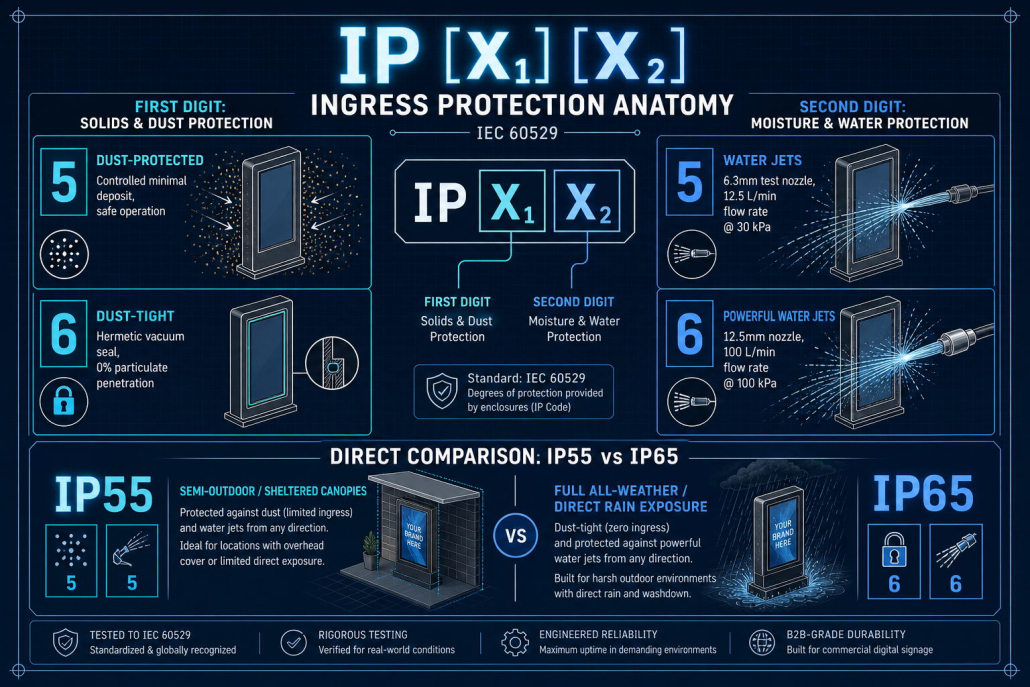
5. Which Rating Is Better for Outdoor Digital Signage?
There is no single answer for every installation. The following examples can help guide initial product selection.
Retail Storefronts and Shopping Areas
Outdoor and semi-outdoor retail displays may face dust, rain, and changing ambient temperatures. The appropriate rating depends on whether the screen is protected by an overhang, installed behind glass, or fully exposed to the elements.
Where fine dust is a significant concern, an IP65 enclosure may provide an advantage. For sheltered installations, a properly designed IP55 product may be sufficient if its rating and installation conditions meet the project’s requirements.
Drive-Thru Menu Boards
Drive-thru menu boards may be exposed to rain, road dust, vehicle exhaust particles, and routine cleaning.
Buyers should evaluate more than the IP rating. Consider the enclosure’s sealing design, cable entry points, drainage provisions where applicable, cleaning instructions, and thermal performance.
If the site is exposed to substantial airborne dust, IP65’s dust-tight protection may be beneficial.
Outdoor Public Information Displays
Displays installed at transport hubs, public facilities, campuses, or outdoor pedestrian areas may encounter a wide range of weather conditions.
The right IP rating should be selected according to local weather, site exposure, maintenance procedures, and the manufacturer’s tested specifications. Additional requirements may include UV resistance, corrosion protection, impact resistance, and a suitable operating temperature range.
Industrial or Dusty Environments
Outdoor locations near construction areas, industrial facilities, unpaved roads, or other dust-generating operations may benefit from dust-tight enclosures.
In these cases, IP65 can be a useful specification to consider. Nevertheless, buyers should assess the type and concentration of contaminants, cleaning methods, and the full equipment design rather than relying on the IP rating alone.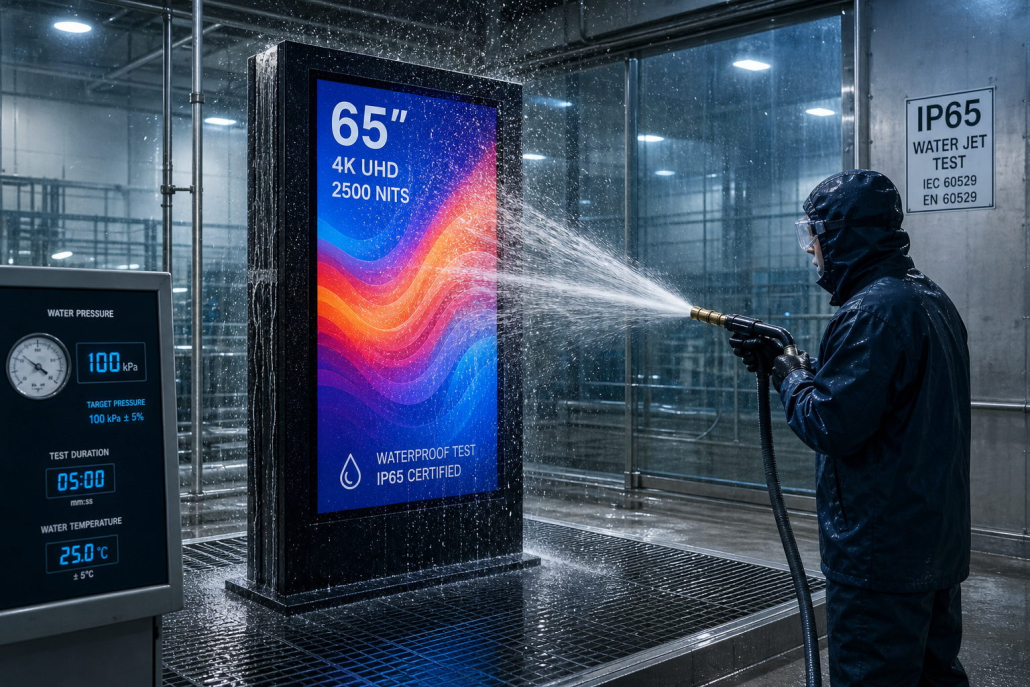
6. What IP Ratings Do Not Tell You
An IP rating is important, but it does not describe every aspect of outdoor durability.
Sunlight and UV Resistance
IP55 and IP65 do not specify whether a display can withstand prolonged UV exposure or whether its screen remains readable in direct sunlight.
For outdoor digital signage, evaluate brightness, anti-glare performance, cover-glass characteristics, and material resistance to UV exposure.
Temperature and Heat Dissipation
An IP rating does not establish the display’s operating temperature range or cooling performance.
Outdoor screens may need effective heat dissipation, temperature-controlled fans, air conditioning, or other thermal-management solutions, depending on the design and installation conditions. Check the manufacturer’s specified operating and storage temperatures.
Corrosion Resistance
IP ratings do not indicate how well a cabinet resists corrosion from salt air, humidity, or industrial pollutants.
For coastal locations or corrosive environments, assess the enclosure material, surface treatment, fasteners, connectors, and other exposed components.
Impact Resistance
IP ratings are not the same as IK impact-protection ratings. Where vandalism, accidental impact, or public access is a concern, evaluate the appropriate IK rating and protective-glass design separately.
Installation Quality
Even a display with an appropriate IP rating can experience problems if it is installed incorrectly. Damaged seals, unsuitable cable glands, improperly closed access panels, or unapproved modifications may compromise the enclosure’s protection.
Always follow the manufacturer’s installation and maintenance instructions.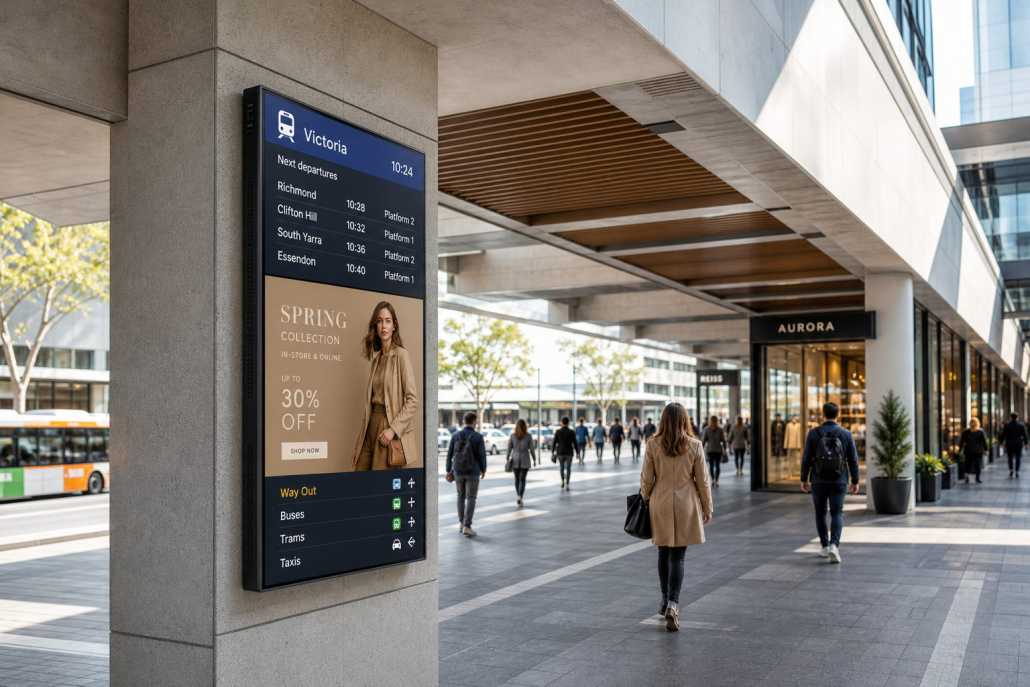
7. How to Choose the Right Outdoor Display Protection Level
Before purchasing outdoor digital signage, work through the following steps.
Step 1: Assess the Installation Environment
Identify whether the display will be fully exposed, partially sheltered, installed near a road, or located in a dusty or corrosive area.
Consider rainfall, wind-driven water, airborne dust, cleaning practices, and seasonal temperature changes.
Step 2: Define the Required IP Rating
Choose a rating based on the actual exposure and project requirements. If dust-tight protection is required, IP65 may be more appropriate than IP55.
Do not assume that all outdoor installations require the same rating. Confirm the required protection with the project specification, applicable regulations, and equipment manufacturer.
Step 3: Verify the Rating of the Complete Display
Ask whether the advertised IP rating applies to the complete assembled display or only to a particular enclosure or component.
Confirm the status of connectors, cable entries, ventilation arrangements, access panels, and any external media-player compartment.
Step 4: Check Brightness and Thermal Performance
Outdoor visibility depends on the ambient light and viewing conditions. Select brightness based on direct sunlight, screen orientation, reflections, and viewing distance.
At the same time, confirm that the display’s thermal-management system can maintain acceptable operating conditions at the expected ambient temperatures.
Step 5: Review Documentation and Maintenance Requirements
Request the relevant technical datasheet, IP test documentation or certification evidence where available, operating-temperature specifications, installation instructions, warranty terms, and maintenance recommendations.
For commercial projects, these details help reduce uncertainty during procurement, installation, and long-term operation.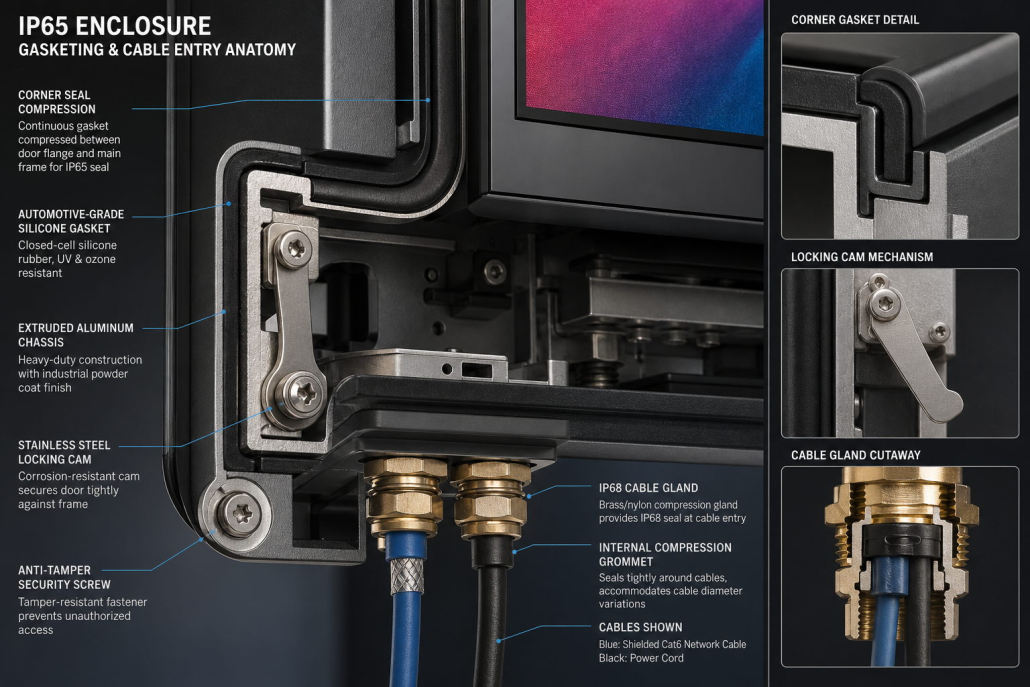
8. Common Mistakes When Comparing IP55 and IP65 Displays
Assuming IP65 is more water-resistant than IP55. Both ratings use the second digit 5, which indicates protection against water jets under specified test conditions. IP65’s advantage is its higher dust protection.
Treating an IP rating as a guarantee of complete weatherproofing. IP ratings cover specified ingress tests, not every weather condition or every aspect of outdoor durability.
Ignoring the complete enclosure design. Seals, connectors, cable entries, ventilation systems, and service panels all affect real-world protection.
Overlooking sunlight visibility. A display may have suitable ingress protection but still be difficult to read in direct sunlight if its brightness and optical design are inadequate.
Ignoring heat and corrosion. Temperature management and corrosion resistance should be assessed separately from IP protection.
Selecting equipment without checking test evidence. Confirm that the claimed rating applies to the product configuration you intend to purchase.
9. IP55 vs IP65: A Practical Checklist for B2B Buyers
Before placing a bulk order, confirm the following:
- Installation environment and exposure conditions documented
- Required dust and water protection defined
- Complete display IP rating verified
- Enclosure seals and cable entry points reviewed
- Brightness and viewing conditions assessed
- Operating temperature and thermal management confirmed
- Corrosion and impact risks evaluated where relevant
- Technical datasheet and supporting test evidence reviewed
- Installation, maintenance, and warranty requirements confirmed
- Sample or product configuration approved before bulk production
10. Choosing an Outdoor Display Manufacturer
For distributors, system integrators, and commercial project buyers, the right manufacturing partner can help ensure that the selected display matches the actual installation requirements.
When evaluating an outdoor digital signage manufacturer, consider:
- Available IP protection options and supporting documentation
- High-brightness display configurations
- Enclosure materials and sealing design
- Thermal-management solutions
- Mounting and installation options
- OEM/ODM customization capabilities
- Production consistency, spare parts, and after-sales support
Kontech provides commercial display solutions, including outdoor digital signage and high-brightness displays. For outdoor projects, buyers should specify the installation environment, required IP rating, brightness, operating temperature, mounting method, and expected order quantity before confirming a configuration.
A clear technical discussion at the beginning of a project can help avoid mismatched specifications and improve long-term reliability.
Conclusion
The difference between IP55 and IP65 outdoor displays is straightforward: both offer protection against water jets at level 5, but IP65 provides a higher level of dust protection through its dust-tight enclosure classification.
IP65 may be preferable for environments where dust-tight protection is required, while IP55 may be suitable when its protection level meets the actual site requirements. Neither rating alone guarantees suitability for every outdoor condition.
For a reliable outdoor digital signage project, assess IP protection alongside brightness, thermal management, corrosion resistance, impact protection, installation quality, and maintenance needs.
Looking for an outdoor digital signage solution for your next project? Contact Kontech to discuss display specifications, environmental requirements, and OEM/ODM customization for your business.
Frequently Asked Questions
1. What is the main difference between IP65 and IP55?
IP65 is dust-tight under the applicable test conditions, while IP55 is dust-protected and may permit limited dust ingress. Both have a water-protection digit of 5, indicating protection against water jets under specified test conditions.
2. Is IP65 waterproof?
IP65 provides protection against dust ingress and water jets under specified test conditions. It does not mean the device is suitable for immersion or every type of water exposure.
3. Is IP55 suitable for outdoor digital signage?
It can be suitable when the complete product is designed for the installation environment and its specified protection meets the project requirements. Buyers should verify dust exposure, water exposure, and the manufacturer’s installation instructions.
4. Does IP65 protect an outdoor display from direct sunlight?
No. IP ratings do not specify sunlight visibility or UV resistance. Brightness, anti-glare performance, materials, and thermal management should be evaluated separately.
5. Does a higher IP rating mean a longer service life?
Not necessarily. Service life also depends on component quality, thermal design, installation, operating conditions, maintenance, and other environmental factors.
6. What should I check when buying IP65 outdoor displays in bulk?
Verify the rating for the complete product configuration, supporting test documentation, brightness, operating temperature, enclosure materials, cable-entry design, mounting requirements, warranty, and spare-parts availability.
