
Window Display Screens: The Ultimate Guide for Retail Advertising
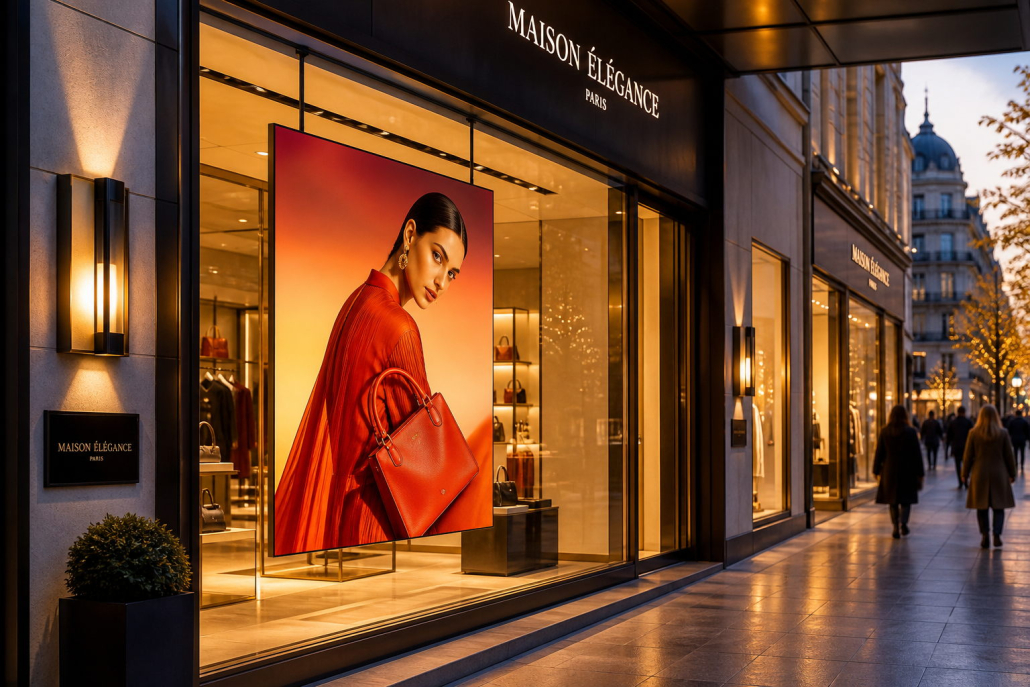
Retail storefronts are one of the most valuable spaces for attracting potential customers. Before shoppers enter a store, they often make quick decisions based on what they see through the window. An eye-catching window display can communicate promotions, introduce new products, strengthen brand recognition, and encourage people to walk inside.
Traditional printed posters have limitations: they are difficult to update, cannot display motion, and often require additional printing and installation costs. Window display screens offer a more flexible alternative, allowing retailers to deliver dynamic advertising, promotional videos, product presentations, and seasonal campaigns through digital signage.
But what are window display screens, how do they work, and how can businesses choose the right solution?
In this guide, we explain the key features, benefits, brightness requirements, installation options, and purchasing considerations for retail window advertising screens. Whether you are a retailer, digital signage distributor, system integrator, or OEM/ODM buyer, this guide will help you make a more informed decision.
1. What Are Window Display Screens?
Window display screens are digital displays installed in or near storefront windows to present advertising and promotional content to passersby. They are commonly used by retail stores, shopping malls, fashion brands, restaurants, banks, automotive showrooms, and other businesses that want to attract attention from outside.
Unlike ordinary indoor TVs or monitors, window-facing digital signage may need to overcome strong ambient light and direct sunlight passing through the glass. For this reason, high brightness, suitable optical performance, and effective heat management are important selection criteria.
Depending on the installation and application, window display screens can be configured as:
- Single-sided displays facing outward toward pedestrians
- Double-sided displays showing content both inside and outside
- Portrait or landscape digital signage
- Wall-mounted, ceiling-suspended, or floor-standing displays
- Custom-sized or custom-branded solutions for specific retail projects
The right configuration depends on storefront layout, viewing direction, available space, lighting conditions, and advertising objectives.
2. Why Are Window Display Screens Important for Retail Advertising?
A storefront window is more than a physical boundary between a store and the street. It is an opportunity to communicate with potential customers before they enter.
Capture Attention in Busy Retail Areas
Moving images, product videos, and changing promotional messages can help a storefront stand out among neighboring businesses. High-brightness digital displays are particularly useful when window glass and outdoor lighting reduce the visibility of ordinary screens.
Update Promotions More Efficiently
Printed posters need to be designed, produced, delivered, and physically replaced. Digital window displays can reduce these recurring steps by allowing content to be updated electronically, depending on the content management system being used.
Retailers can schedule campaigns for different times of day, promote limited-time offers, and adapt messages to seasonal events without repeatedly printing new materials.
Showcase More Products and Messages
A single digital screen can present multiple products, campaigns, videos, and brand messages in rotation. This makes it easier to promote a broader product range without filling the entire window with printed materials.
Maintain Consistent Brand Communication
For retail chains and franchises, digital signage can help maintain consistent promotional content across multiple locations. With a compatible centralized content management platform, marketing teams may be able to distribute campaigns to many stores from one location.
Support a Modern Storefront Experience
Well-designed digital content can complement a store’s interior design and brand identity. Retailers can use product demonstrations, lifestyle videos, animations, and promotional graphics to make storefront communication more engaging.
The result depends on screen placement, content quality, lighting, and the relevance of the message to the target audience.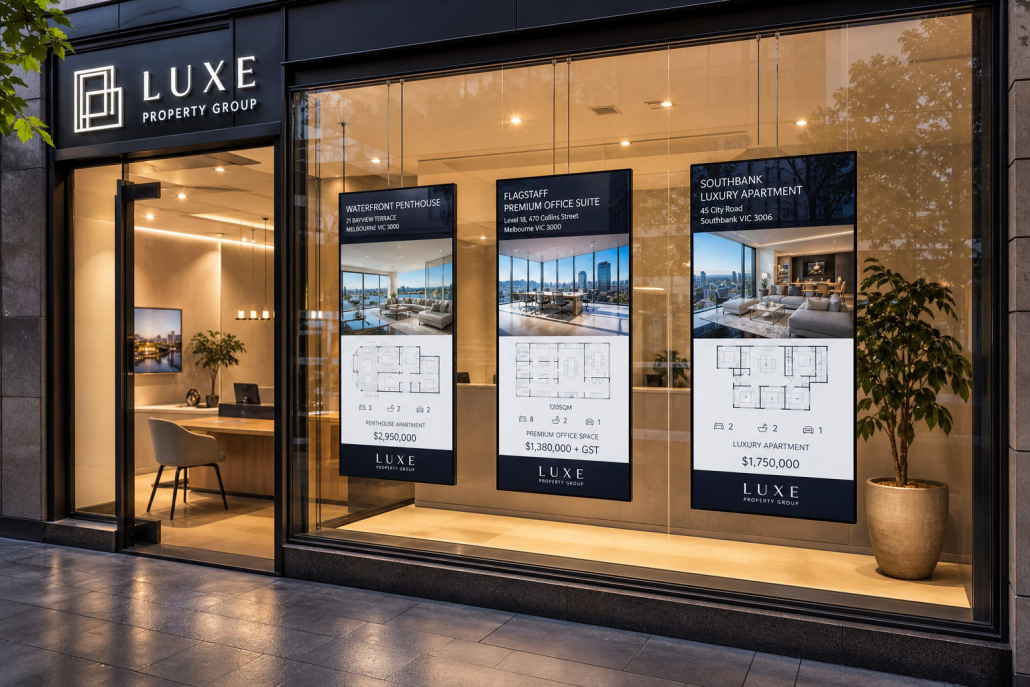
3. Why Brightness Matters: Choosing a Screen for Sunlit Windows
Brightness is one of the most important specifications for a window display screen. It is measured in nits, with one nit equal to one candela per square meter (cd/m²).
A conventional indoor display may perform well in an office or a shop away from direct sunlight, yet become difficult to read when placed behind a bright storefront window.
Understanding Brightness Levels
The following ranges can serve as an initial reference for product selection. They are not universal requirements: actual needs depend on window orientation, sunlight exposure, glass transmission, reflections, viewing distance, and screen placement.
| Indicative Brightness | Potential Application | Important Considerations |
|---|---|---|
| 300–500 nits | Controlled indoor lighting | May be insufficient for bright, sunlit windows |
| 500–700 nits | Typical indoor retail environments | Suitable where direct sunlight is limited |
| 700–1,500 nits | Bright retail areas and some window installations | Requires evaluation of actual daylight conditions |
| 1,500–3,000+ nits | Strong ambient light and demanding window-facing applications | Check thermal design, glare, and real-world visibility |
These ranges overlap because the same brightness level can produce different results in different storefronts. Displays facing direct sunlight may need a different specification from those installed in shaded windows.
How to Improve Window Display Visibility
When selecting a high-brightness window display, consider more than the maximum nit rating.
- Brightness: Choose a model suitable for the expected daylight and sunlight conditions.
- Anti-glare performance: Evaluate reflections from the glass, surrounding buildings, and outdoor surfaces.
- Contrast and content: Use clear typography, strong visual hierarchy, and appropriate color contrast.
- Viewing angle: Ensure the screen remains readable from the directions pedestrians are likely to approach.
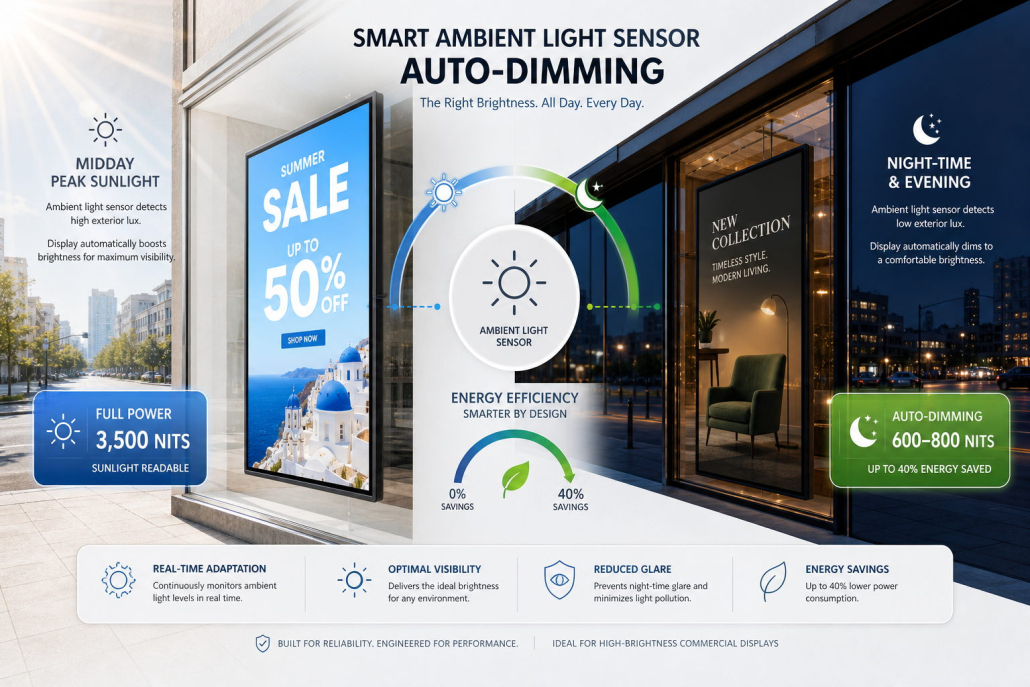
- Automatic brightness control: Where supported, a light sensor can adjust screen brightness to changing ambient conditions.
- Thermal management: High-brightness operation generates heat, so ventilation and cooling design matter.
If possible, evaluate a sample in the actual installation environment before committing to a large deployment. A specification sheet is useful, but a real-world visibility test can reveal reflections and viewing issues that are difficult to predict.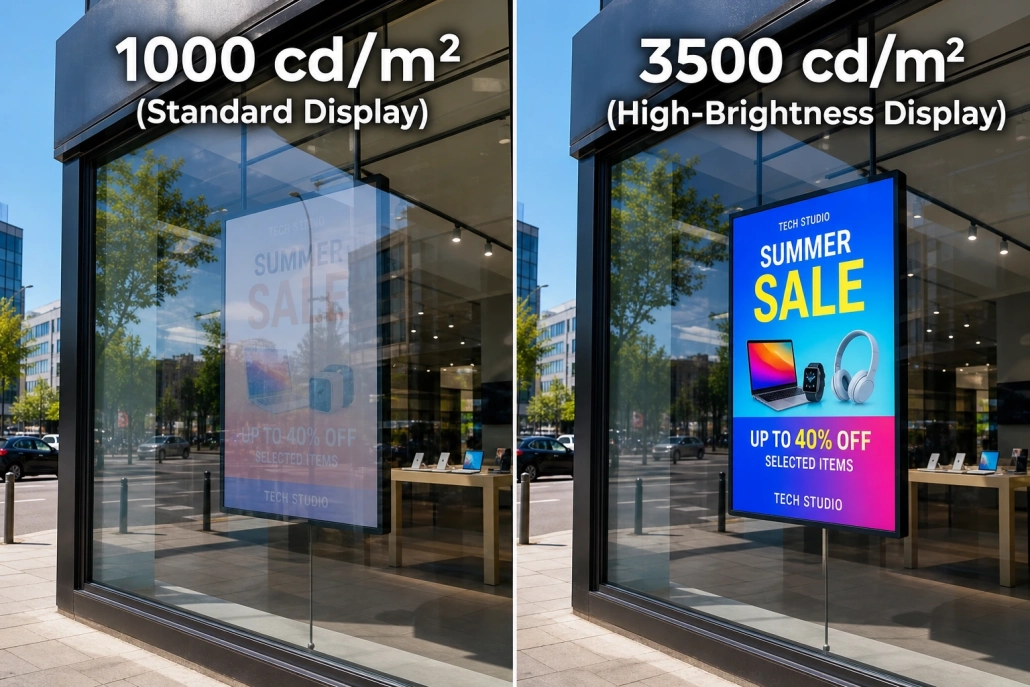
4. Single-Sided vs. Double-Sided Window Display Screens
One of the first decisions is whether the display should face only the street or communicate with viewers on both sides of the storefront glass.
Single-Sided Window Display Screens
Single-sided displays present content in one primary viewing direction, usually toward people outside the store.
They are often suitable for:
- Retail promotions facing pedestrians
- Fashion and luxury storefront advertising
- Shopping mall shop-window campaigns
- Restaurant offers and product highlights
- Stores with limited installation space
The main advantages are a straightforward viewing direction and a configuration that can be optimized for outward-facing advertising.
Double-Sided Window Display Screens
Double-sided displays can show content toward both the street and the store interior. This configuration can make better use of storefront space when both audiences matter.
Potential applications include:
- Retail windows that also face customers inside the store
- Shopping malls with foot traffic on both sides
- Transit retail and commercial spaces
- Stores that want to communicate promotions both indoors and outdoors
Before choosing a double-sided model, verify whether it uses two independent display panels or another specific optical design, and confirm the brightness, content control, viewing direction, and power requirements for each side.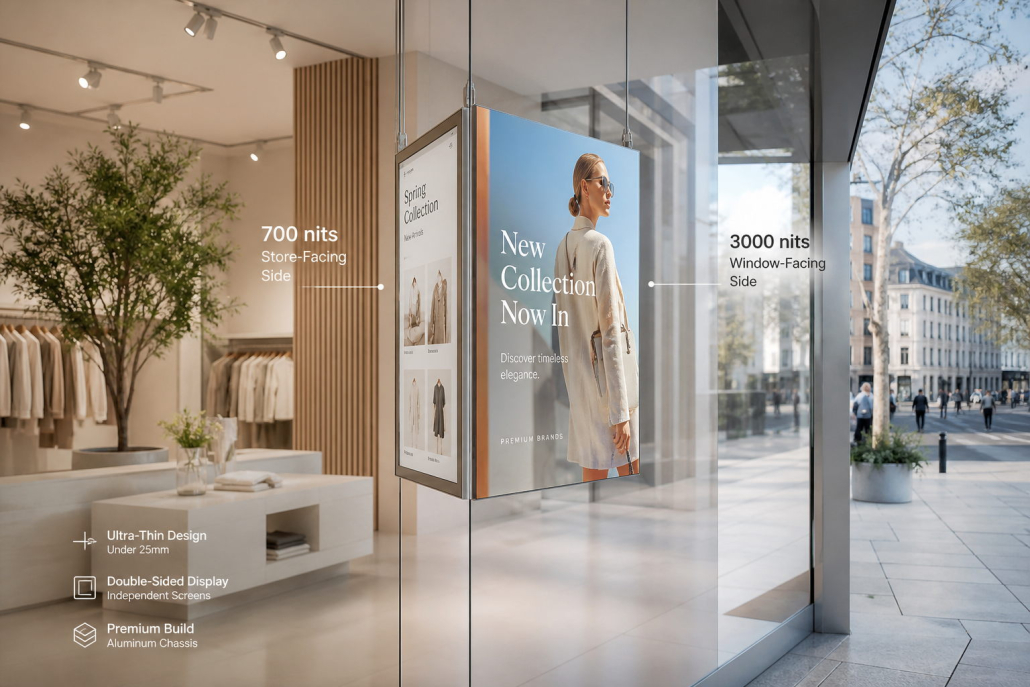
Which option is better? Choose a single-sided display when outdoor advertising is the primary objective and a double-sided model when communication on both sides provides a clear business benefit.
5. Choose the Right Screen Size and Installation Method
The right screen size should match the available storefront space, viewing distance, content layout, and overall store design.
Common commercial display sizes include 32-inch, 43-inch, 49-inch, 55-inch, 65-inch, and larger formats, although availability depends on the manufacturer and product series.
When selecting a screen size, consider:
- The width and height of the available window area
- The distance between the screen and pedestrians
- Whether the content will use portrait or landscape orientation
- The number of displays needed to cover the window
- The position of window frames, shelves, and other visual obstructions
- The distance required between the screen and the glass for installation and servicing
Common Installation Options
Ceiling-suspended displays: Useful when retailers want to keep the floor area clear and position screens within the upper part of a window.
Wall-mounted displays: Suitable for storefronts where the structure supports secure mounting and the screen can be positioned at an appropriate viewing height.
Floor-standing displays: Helpful when a movable or freestanding solution is preferred and floor space is available.
Custom installation structures: Appropriate for multi-screen projects, unusual window dimensions, or brand-specific retail environments.
Before installation, confirm mounting points, cable routing, ventilation clearance, electrical access, and local safety requirements. The screen should not obstruct emergency exits, accessible routes, or essential storefront functions.
6. Key Features to Look for in a High-Quality Window Display Screen
A suitable window display screen should be selected as a complete system rather than by brightness alone.
High-Brightness LCD Panel
A high-brightness panel helps advertising remain visible in bright retail environments. The required brightness should be determined by actual installation conditions rather than selecting the highest available specification by default.
Slim and Space-Efficient Design
A slim enclosure can make the display easier to integrate into storefronts where space is limited. A narrow-bezel design may also help create a cleaner visual appearance.
Effective Heat Dissipation
High-brightness displays generate heat during operation. A well-designed thermal management system helps maintain appropriate operating conditions and supports stable performance.
Confirm the manufacturer’s recommended ambient temperature, ventilation requirements, and operating limits before installation.
Scheduled Power On and Off
Scheduling can help retailers align display operation with store opening hours, reduce unnecessary operating time, and simplify routine management.
Automatic Brightness Adjustment
If supported, a built-in light sensor can adjust brightness according to ambient lighting. This can help balance visibility and power consumption as lighting conditions change.
Remote Content Management
Depending on the hardware and software configuration, a display may support USB playback, network-based updates, scheduled playlists, or centralized content management. Confirm which functions are included and whether additional software or licensing is required.
Flexible Mounting Options
Ceiling suspension, wall mounting, floor stands, and custom brackets may be available depending on the product model. Confirm the mounting method before finalizing the display specification.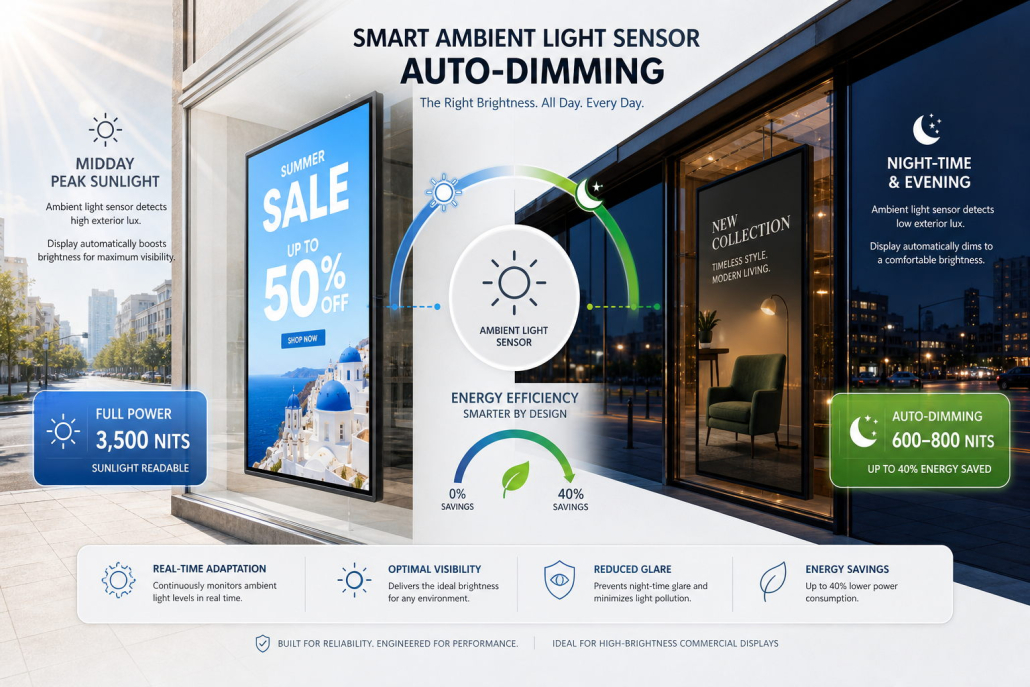
7. Content Best Practices for Retail Window Advertising
Even a technically advanced display can underperform if the content is difficult to understand or irrelevant to passersby. Effective window advertising combines appropriate hardware with clear, timely messaging.
Communicate One Main Message
People passing a storefront may only glance at the screen for a few seconds. Lead with one primary message, such as a seasonal promotion, new product launch, or limited-time offer.
Use Readable Text and Strong Contrast
Keep text short and large enough to read from the expected viewing distance. Use a clear contrast between text and background, and avoid overly complex layouts.
Design for Both Daytime and Evening Conditions
Daylight and nighttime lighting can produce very different viewing experiences. Where possible, test content and brightness in both conditions, and use automatic brightness control if the selected model supports it.
Use Motion Strategically
Short product demonstrations, animated transitions, and lifestyle videos can attract attention. However, excessive motion or frequent visual changes may make messages harder to absorb.
Keep Content Fresh
Update promotions according to the retail calendar, product launches, local events, and customer interests. For multi-store businesses, a compatible content management platform can help coordinate updates.
Consider the Viewing Direction
Design the screen layout for the audience’s actual position. A display viewed from across a street may require larger text and simpler messaging than a screen viewed by people standing close to the window.
8. Where Are Window Display Screens Commonly Used?
Window-facing digital signage is suitable for many industries.
Fashion and Apparel Retail
Promote seasonal collections, new arrivals, brand campaigns, and special offers while maintaining a visually consistent storefront.
Shopping Malls and Department Stores
Use window displays to highlight promotions, product launches, tenant campaigns, and shopping events.
Restaurants and Cafés
Show menu highlights, combo offers, new drinks, meal promotions, and time-sensitive offers to people passing the storefront.
Electronics and Mobile Phone Stores
Present product features, product demonstrations, launch videos, and comparison messages to attract shoppers.
Automotive Showrooms
Display vehicle features, financing promotions, model introductions, and brand videos in showroom windows.
Banks and Service Businesses
Communicate service information, appointment guidance, campaigns, and other customer-facing messages, subject to applicable privacy and compliance requirements.
The best display configuration depends on the viewing environment, the message being delivered, and the business’s operating requirements.
9. How to Select a Reliable Window Display Screen Manufacturer
For distributors, retail chains, advertising solution providers, and project buyers, supplier selection is a critical part of procurement.
A capable manufacturer should be able to explain how its products match the application, provide model-specific specifications, and support technical discussions before mass production.
Evaluate suppliers using the following criteria:
- Product experience: Experience with high-brightness commercial displays and window-facing applications.
- Technical documentation: Clear specifications for brightness, resolution, operating hours, power consumption, mounting, and thermal requirements.
- Customization capability: Support for suitable screen configurations, enclosure design, mounting solutions, and branding requirements.
- Quality assurance: Defined inspection and testing procedures, with documentation available for the relevant product.
- Compliance: Applicable certifications and declarations for the target market and exact product configuration.
- Production capacity: Ability to meet the project’s order quantity and delivery schedule.
- After-sales support: Clear warranty terms, troubleshooting processes, and spare-parts arrangements.
For large deployments, consider requesting a sample or pilot batch and agreeing on acceptance criteria before proceeding with full production.
Do not rely on general claims such as “industrial grade” or “outdoor ready” without checking the detailed specifications and suitability for the intended environment.
10. OEM/ODM Window Display Solutions for B2B Buyers
Standard products may be sufficient for some retail installations, but distributors, brand owners, and system integrators may need a more tailored solution.
OEM/ODM discussions may cover:
- Screen size and display configuration
- Single-sided or double-sided viewing
- Brightness options suited to the installation environment
- Enclosure dimensions, color, and branding
- Ceiling-suspension or wall-mounting structures
- Power, connectivity, and content-management requirements
- Packaging, labeling, and documentation
- Project-specific testing and quality requirements
When requesting a quotation, provide the target market, expected quantity, installation drawings or photos, required specifications, operating schedule, and any branding or integration requirements.
Clear project information helps the manufacturer assess feasibility, identify suitable models, and reduce the risk of costly changes later.
11. Window Display Screen Purchasing Checklist
Before placing an order, review the following checklist:
- Is the screen designed for the actual indoor, window-facing, or semi-outdoor environment?
- Is the brightness appropriate for the sunlight and ambient lighting conditions?
- Will the display be single-sided or double-sided?
- Are the screen size, resolution, orientation, and viewing angles suitable?
- Does the thermal design match the expected operating conditions?
- Are the installation method, mounting hardware, and cable routing confirmed?
- Are scheduling, brightness control, and content-management features clearly specified?
- Do the rated operating hours and warranty terms meet the project requirements?
- Have compliance requirements for the destination market been verified?
- Can the supplier provide the required customization, quantity, and delivery schedule?
Looking for a window display screen supplier for your next project?
Contact Kontech with your target application, preferred screen size, brightness requirements, estimated order quantity, and customization needs. Our team can help you evaluate a suitable window display solution for your retail advertising project.
