
Indoor Digital Signage vs Window Display: What Is the Difference?
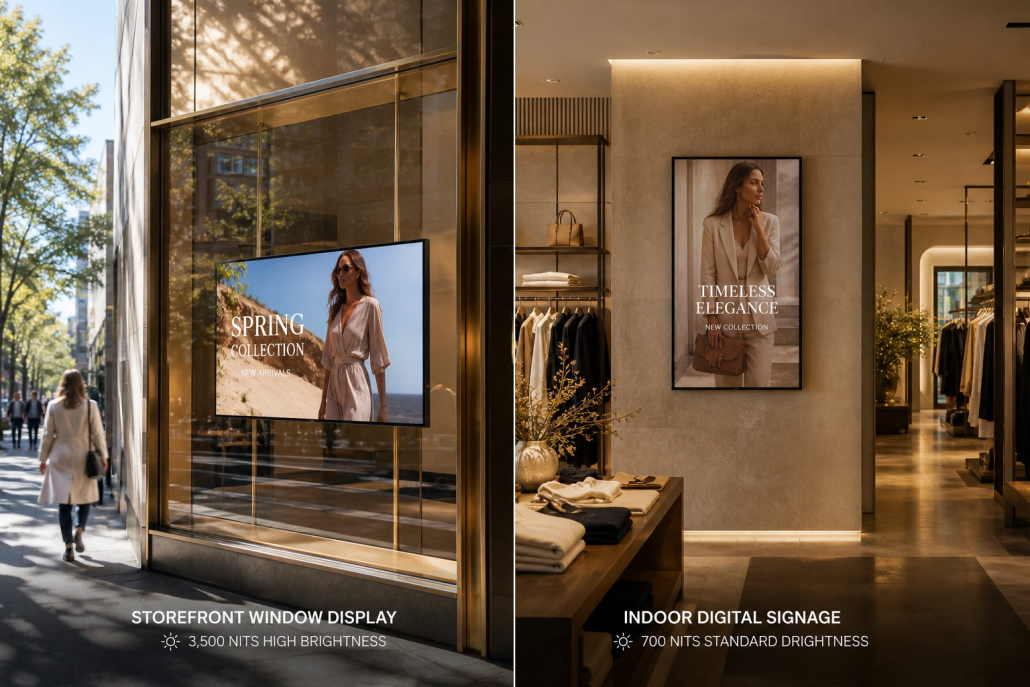
When upgrading a commercial venue or retail storefront with dynamic digital screens, one of the most frequent questions business owners and AV integrators ask is:
“Can I simply take a standard indoor digital signage screen and place it behind my store window to save costs?”
The short answer is an emphatic no. While indoor digital signage and window displays may appear similar at a casual glance—both featuring sleek LCD panels and digital media players—they are engineered for fundamentally different physical environments.
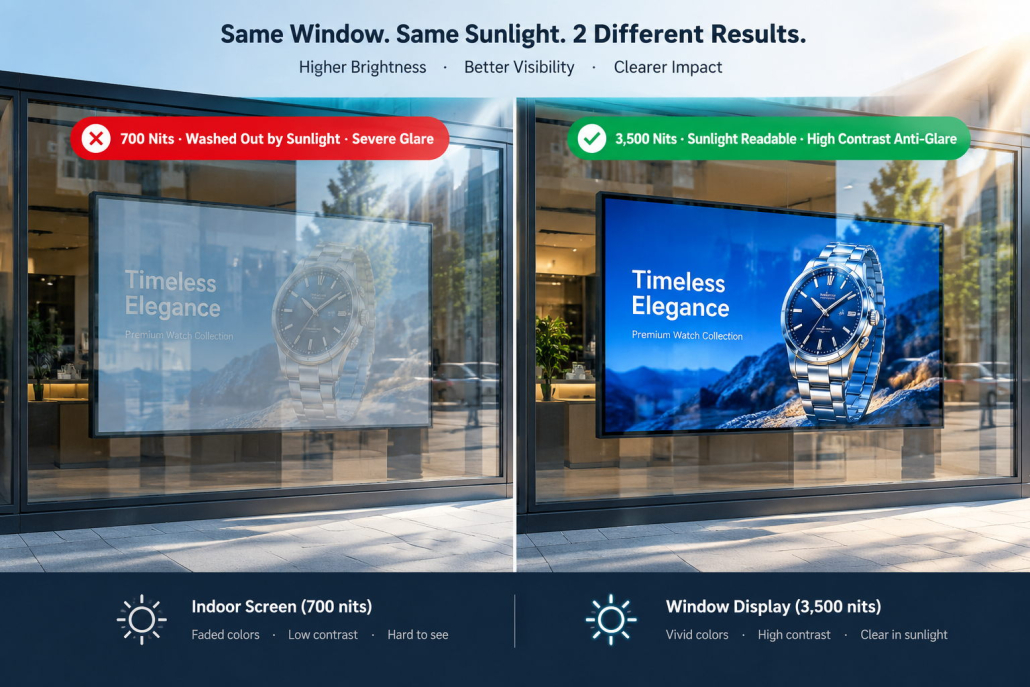
Placing a standard indoor commercial display in a sun-drenched storefront window almost always results in washed-out, unreadable content, severe mirror reflections, and catastrophic permanent screen damage caused by solar heat buildup (known as solar blackening defects).
Understanding the engineering differences between Indoor Digital Signage and High-Brightness Window Displays is critical for safeguarding your hardware investment, optimizing energy consumption, and achieving maximum customer conversion.
1. Quick Summary Comparison: Indoor Signage vs. Window Display
Before diving into deep technical analyses, here is a side-by-side specification overview based on industrial manufacturing standards:
2. The 5 Core Differences Between Indoor and Window Displays
2.1. Screen Brightness & Ambient Light Battles (700 Nits vs. 3,500 Nits)
The single most decisive differentiator is optical luminous intensity, measured in nits (cd/m²):
- Indoor Digital Signage (500–700 nits): In standard indoor commercial settings (shopping malls, grocery stores, corporate conference rooms), ambient illuminance typically ranges between 300 and 800 lux. A commercial screen operating at 500 to 700 nits delivers rich color contrast, sharp typography, and comfortable viewing without causing eye fatigue.
- Window Display Screens (2,000–3,500+ nits): On a clear day, direct sunlight hitting storefront glass exceeds 10,000 to 100,000 lux. In this intense lighting environment, a 500-nit screen appears as dark as an unpowered mirror. Window displays require a minimum of 2,500 to 3,500 nits of ultra-high brightness combined with anti-glare (AG) surface treatments to cut through glass reflections and project punchy, daylight-readable visuals to pedestrians on the street.
2.2. Thermal Management & Solar Blackening Resistance (High-TNI Panels)
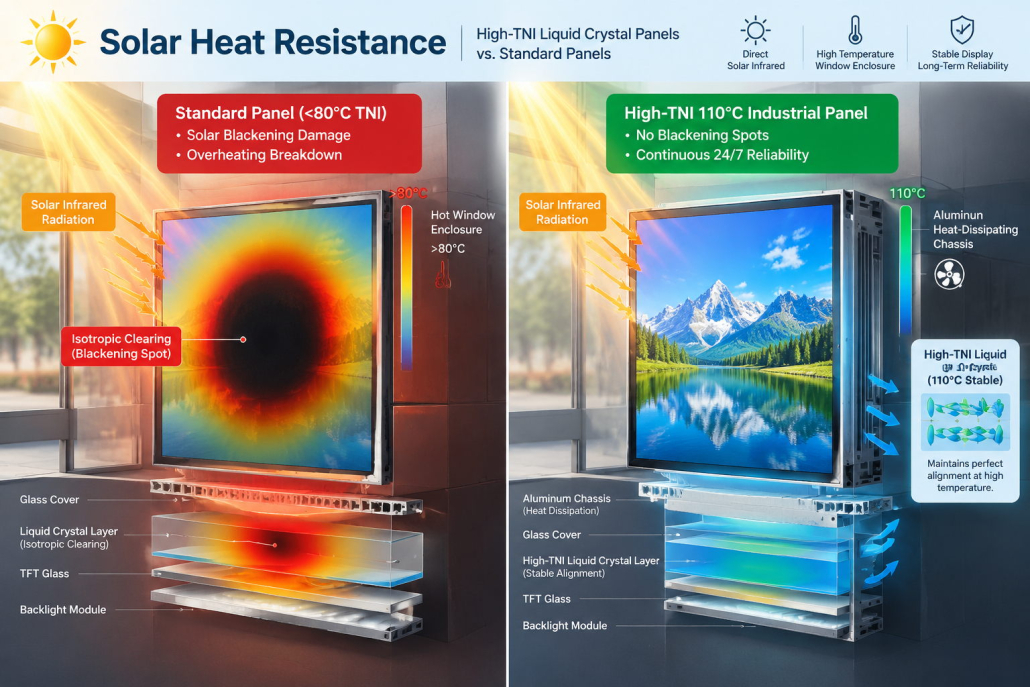
Storefront windows create a severe greenhouse heat trap. Solar infrared and ultraviolet rays pass through the window glass and bombard the display surface, driving internal enclosure temperatures well above 80°C (176°F):
- Indoor Screens: Standard liquid crystal panels have an isotropic clearing point (TNI) between 75°C and 85°C. When exposed to direct solar heat in a window, the liquid crystals break down, creating permanent, ugly black spots (solar clearing defect) that destroy the panel.
- Window Displays: Professional window displays—such as Kontech’s High-Brightness series—are built with specialized High-TNI 105°C or 110°C industrial liquid crystal panels (sourced from tier-1 manufacturers such as LG, BOE, and AUO). Even when surface temperatures exceed 100°C under scorching summer sun, the panel operates flawlessly without blackening.
2.3. Anti-Glare & Polarized Sunglasses Visibility (QWP Technology)
Outdoor pedestrians frequently wear polarized sunglasses during sunny daytime hours:
- With standard indoor displays, the screen’s linear polarizing filter interacts destructively with sunglasses, causing the screen to look completely blacked out from certain angles.
- High-grade commercial window displays incorporate QWP (Quarter Wave Plate) optical films, converting linear polarized light into circular polarized light. This guarantees that pedestrians wearing sunglasses can clearly read product promotions and pricing from any viewing angle.
2.4. Form Factor Innovations: The Rise of Ultra-Thin Double-Sided Screens
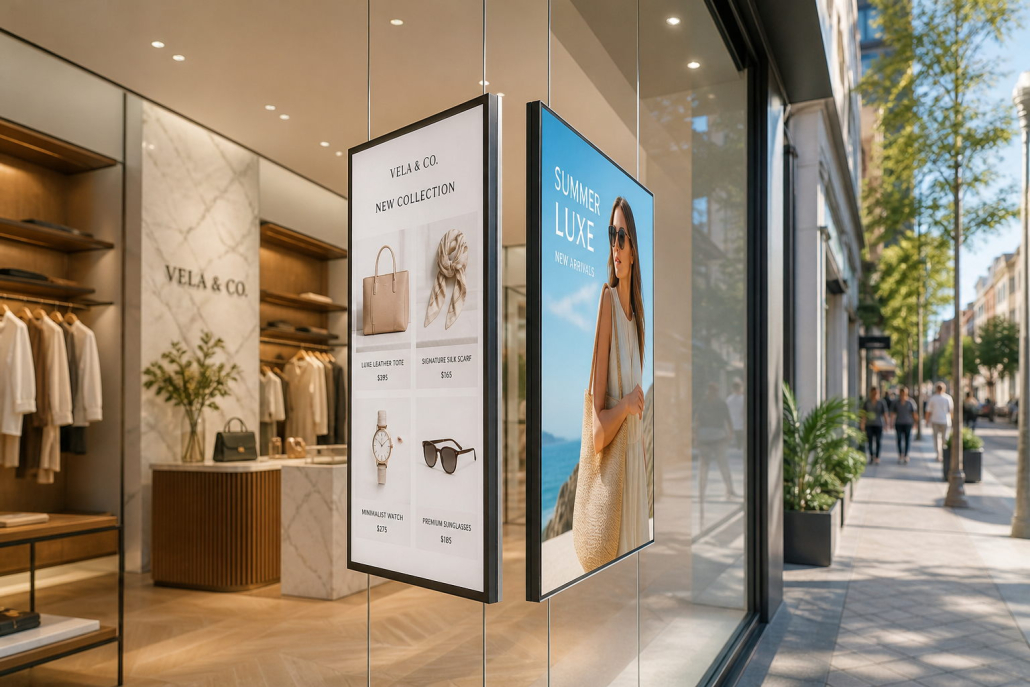
Indoor signage is primarily single-sided—mounted flat against walls or integrated into freestanding kiosks. Window displays, however, have evolved to capture traffic in two directions:
- Ultra-Thin Double-Sided Window Displays: A specialized dual-screen unit suspended by sleek aircraft-grade steel cables.
- Street-Facing Side: Pumps out 3,000 nits of ultra-high brightness to stop outdoor pedestrians.
- Store-Facing Side: Operates at a comfortable 700 nits to deliver targeted promotional messaging to shoppers already inside.
- Space Efficiency: Housed in an all-aluminum profile less than 25mm thick, maximizing retail floor space while doubling advertising utility.
2.5. Intelligent Power Management & Auto-Dimming
Running a 3,500-nit screen at 100% capacity around the clock is neither eco-friendly nor cost-effective:
- High-brightness window displays feature an integrated smart ambient light sensor. During midday sun peaks, brightness surges to full 3,500-nit output. As dusk falls and night arrives, the screen automatically throttles down to 500–800 nits.
- This dynamic adjustment prevents night-time glare and light pollution while slashing annual commercial electricity consumption by up to 40%.
3. Application Decision Matrix: Which Display Do You Need?
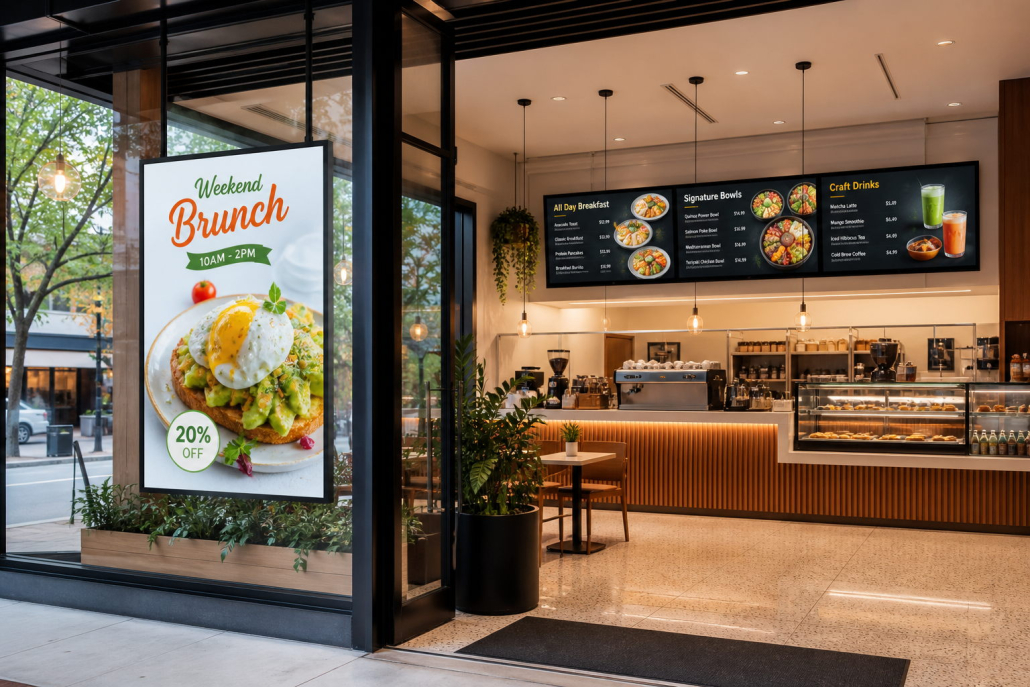
To select the right commercial display for your specific deployment, evaluate your installation location and marketing objectives:
Installation Site Analysis:
├─ Is the screen installed behind exterior glass facing outdoors?
│  ├─ YES → Exposed to direct sunlight?
│  │         ├─ YES → High-Brightness Window Display (2,500–3,500+ nits, High-TNI Panel)
│  │         └─ NO (North-facing or deep awning) → Window Display (1,500–2,000 nits)
│  └─ NO (Inside the store/building)
│      ├─ Digital Menu Board above ordering counter → Indoor High-Brightness Display (700 nits)
│      ├─ Aisle Wayfinding / Retail Wall Poster → Indoor Digital Signage (500 nits)
│      ├─ Interactive Customer Kiosk → Touch Screen Kiosk (500 nits, Capacitive Touch)
│      └─ Corporate Meeting Room → Interactive Flat Panel (400–500 nits, 4K Touch)
Choose Indoor Digital Signage When:
- Installing in indoor corridors, shopping mall interior walkways, dining areas, or office lobbies.
- Creating multi-screen digital menu boards for quick-service restaurants (QSR) or coffee shops (Kontech 700 nits series).
- Interactive touch-screen applications (self-ordering kiosks, wayfinding totems).
- Budget optimization is primary, and ambient lighting is controlled and consistent.
Choose a Window Display When:
- Installing within 1 meter behind exterior storefront glass facing outdoor sidewalks or parking lots.
- The storefront receives direct or indirect sunlight during the day.
- You operate a high-street retail boutique, real estate agency, bank branch, automotive showroom, or travel agency.
- You need dual-sided advertising to communicate with outside pedestrians and inside customers simultaneously.
4. Why Partner with Kontech for Your Commercial Display Strategy
Founded in 2009 with over 17 years of specialized ODM/OEM experience and a 30,000㎡ advanced manufacturing facility, Kontech is a global leader in commercial display solutions:
- A+ Grade Original Industrial Panels: We exclusively partner with tier-1 panel manufacturers (AUO, LG, BOE) to ensure unmatched color accuracy, 4K UHD clarity, and a lifespan exceeding 50,000 hours.
- Proprietary High-TNI Optical Technology: Kontech window displays withstand panel surface temperatures up to 110°C, guaranteeing zero solar blackening in high-temperature equatorial climates.
- Comprehensive Product Portfolio: From 21.5″ to 86″ indoor digital menu boards and touch kiosks to 2,000–5,000 nits ultra-high-brightness hanging window displays.
- KONTECH Cloud CMS Ecosystem: Full remote device control, multi-zone split-screen playback, scheduled day-parting, and centralized campaign distribution across thousands of networked screens.
- International Certifications & Peace of Mind: Fully certified with CE, FCC, CB, RoHS, and backed by an industry-leading 3-year commercial warranty with less than 10% brightness degradation over 5 years.
